
Home · Blog · How to add a bot to a Telegram group: commands and buttons for all members
How to add a bot to a Telegram group: commands and buttons for all members
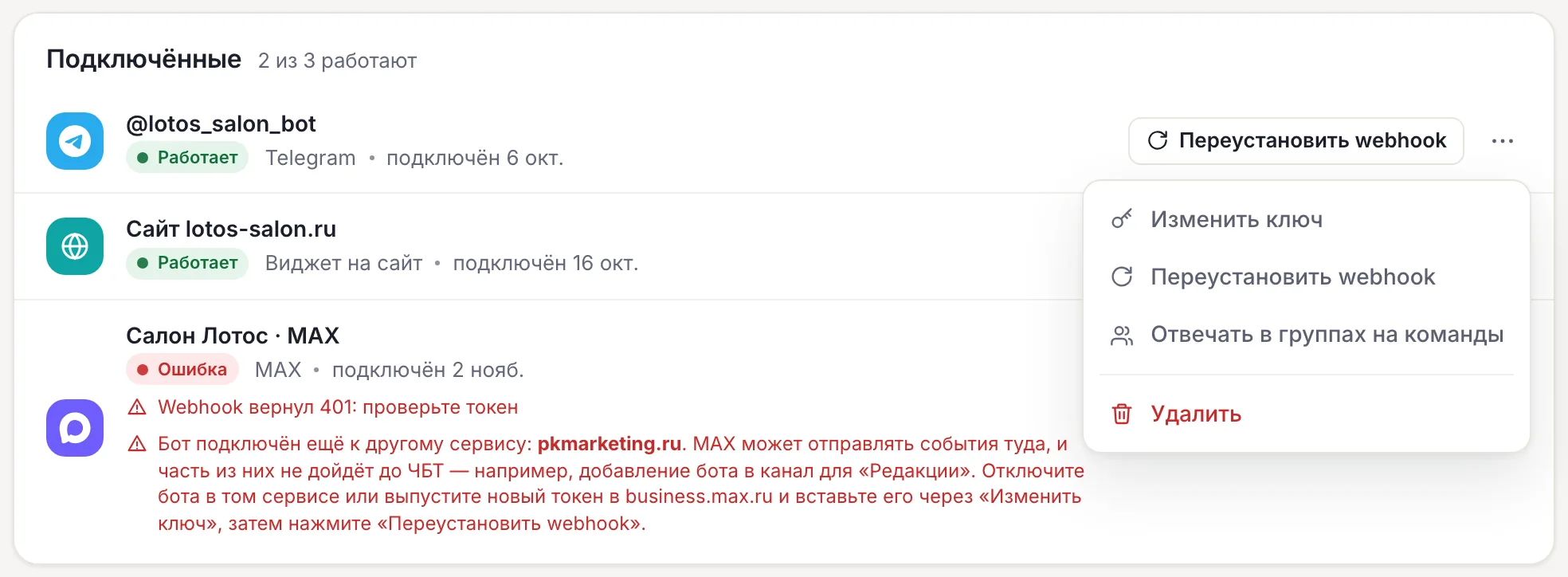
For a CHBT bot to work in a Telegram group, do two things: in CHBT open Channels → “⋯” in the Telegram channel row → Respond to commands in groups, and in Telegram add the bot as a group member. Admin rights are not needed for this. Check — write /start@your_bot_name in the group: the bot answers with the flow that has the Command (/start) trigger. In a group the bot responds only to commands addressed to it and taps on its buttons, and skips members’ regular conversation — so it does not clutter the chat. Below — the steps, what changes in the flow, what does not work in a group and how to make a menu and a quiz.
What to prepare
- A Telegram bot connected to CHBT in Channels.
- A group or supergroup in Telegram where you can add members.
- The owner or admin role in the CHBT project — only it can switch the channel setting.
- An active flow with the Command (/start) or Keywords trigger — the bot will answer it in the group.
Steps
- Turn on replies in groups. Channels → “⋯” in the Telegram channel row → Respond to commands in groups. The item changes to Don’t respond in groups — that means it is on. The setting applies to all groups of this channel at once.
- Add the bot to the group. In Telegram: group → add member → find the bot by @username.
- Check. Write
/start@your_bot_namein the group.
Result: the bot answers in the group, and a contact named after the group appears in CHBT Contacts. If there is no answer — see “If the bot is silent in a group” below.
What the bot responds to in a group
| Message in the group | Bot reaction |
|---|---|
A command to it: /kviz, /start@bot_name | Answers according to the flow |
A command to another bot: /start@other_bot | Does not react |
| A tap on the bot’s button by any member | The flow continues |
| A member’s regular text | Does not react |
| A voice message | Does not react or transcribe |
The bot cannot be switched to “answer everything” in a group.
What changes in the flow
- The contact is the group itself. One flow for the whole chat: one member started it with a command, another tapped the next step’s button — the flow continues. Tags and fields are set on the group, not on a person.
- Limit. On the Free plan a group is one contact out of 30, however many members it has.
- The
chat_typevariable. In a group CHBT sets it togroup. Add a Condition on this variable to split branches: in private messages — collect a phone, in a group — give a link to the bot right away. - Broadcasts. A group is a regular Telegram contact, so a broadcast without tags may also land in the shared chat. Send broadcasts by tags that are set on people in private messages.
What does not work in a group
- The Any message trigger — does not fire.
- A text answer at a step with buttons — the bot skips it.
- Data collection — a member’s text does not reach the flow, a name or phone cannot be collected. Give a link button to the bot: in private messages Data collection and Payment work as usual.
- Voice transcription — no.
- Operator push about messages in a group — does not arrive.
Example: a menu for a work group
- Create a flow with a Keywords trigger: the word
/menu, Exact match mode. In a group the bot receives the command without its name, even if it was written as/menu@bot_name. - The first step — a Message with the buttons “Rules”, “Schedule”, “Contacts”.
- Lead each button to its own Message with text or a link to a document.
- Turn the flow on.
Check: any member writes /menu@bot_name — the menu appears in the chat, everyone can tap a button, everyone sees the answer.
A quiz for the whole chat
For a quiz the editor has the Quiz question and Quiz results blocks. In Telegram a question arrives as a built-in quiz with a timer from 5 to 600 seconds: every member answers, each with their own points. Quiz results publishes a table of players by points.
Start: the host writes a command in the group, for example /kviz@bot_name, the bot asks the questions one by one and names those who answered correctly when the timer runs out. In MAX, VK and on the website the same questions come as buttons. More — on the page about quiz bots.
How to turn the bot off in one chat
Put Action → Go silent in this chat at the end of the flow. After that the bot in this chat answers neither commands, nor buttons, nor the continuation of a Pause. To bring it back — the /start command. In other groups and in private messages the bot keeps working.
So that the bot does not answer in any group, turn off Respond to commands in groups in Channels — the item changes to Don’t respond in groups.
If the bot is silent in a group
| Check | What to fix |
|---|---|
| The channel menu shows the Respond to commands in groups item | Press it — replies in groups are off |
| A command without the bot name or with another bot’s name | Write /start@your_bot_name |
| The flow card shows the Draft badge | Turn the flow on |
| Go silent in this chat fired earlier | Send /start |
| You are waiting for a reply to a regular message | In a group the bot does not answer it by design |
It does not answer in private messages either — the group is not the issue: go through the “Telegram bot is silent” checklist.
Telegram botQuiz botsBots for a Telegram channelTelegram bot is silent