
Home · Blog · Broadcast to VK community subscribers: who gets the message and how to build a list
Broadcast to VK community subscribers: who gets the message and how to build a list
You cannot send a private-message broadcast to all community subscribers: under VK rules a community writes only to those who wrote to it themselves or allowed messages. In CHBT a broadcast goes to contacts from the Contacts section — those who wrote to the community or tapped the bot’s button after it was connected. Sending: Broadcasts → New broadcast, the text, a tag in the To field, for example the “newsletter” consent tag, then Create a broadcast. The section is available from the Basic plan. Below — how to turn subscribers into recipients, how to send only to VK, what the name looks like and what delivery errors mean.
Who will receive the broadcast
| Person | Gets the broadcast? |
|---|---|
| Subscribed to the community, never wrote | No — they are not in Contacts |
| Pressed “Allow messages” but wrote nothing | No — CHBT creates a contact only on a message or a button tap |
| Wrote to the community after the bot was connected | Yes, if they match the tags in To |
| Later forbade messages from the community | No — counted as an error |
No service can bypass the VK rule. So the task is to give subscribers a reason to write to the community.
How to turn subscribers into recipients
- A post with a code word. “Write SELECTION in the community messages — we will send new arrivals”. In CHBT create a flow with a Keywords trigger and the word “selection”, the first step — Action → Add a tag
selection, then a reply with the selection. - The “Write a message” button in the community and a pinned post about what the conversation gives: a booking, a discount, an answer to a question.
- A reply to a comment. A Studio code-word rule replies in the thread with a link to a conversation with the bot.
- A poll or a quiz in community messages — a few questions with buttons, at the end a result and a tag by interest.
How to check: Contacts → Filter by tag selection shows how many people responded.
Consent to advertising broadcasts
A person who wrote “SELECTION” allowed an answer to their request but did not subscribe to weekly advertising. For regular advertising broadcasts, ask for consent in the same flow:
- A Message: “Shall we send you new arrivals once a week?” with the buttons Yes and No.
- Yes → Action → Add a tag
newsletter. - A flow on the word “stop” → Remove a tag
newsletter.
A ready flow with two consents and an opt-out is the Broadcast consent template, a breakdown — in the article how to build a broadcast list in a bot.
How to send a broadcast only to VK
The broadcast form does not choose a messenger: without tags it goes to all contacts in Telegram, MAX and VK. If the bot works in several messengers:
- In the welcome flow add a Condition on the Channel field.
- In the VK branch — Add a tag
vk. - In the broadcast, put this tag in the To field.
Several tags in To work as “OR”: vk, newsletter will send both to everyone from VK and to everyone who agreed from other messengers. For “VK and consent” you need a combined tag from a flow — how to make it is covered in the article on broadcasts by segments.
The name in the text
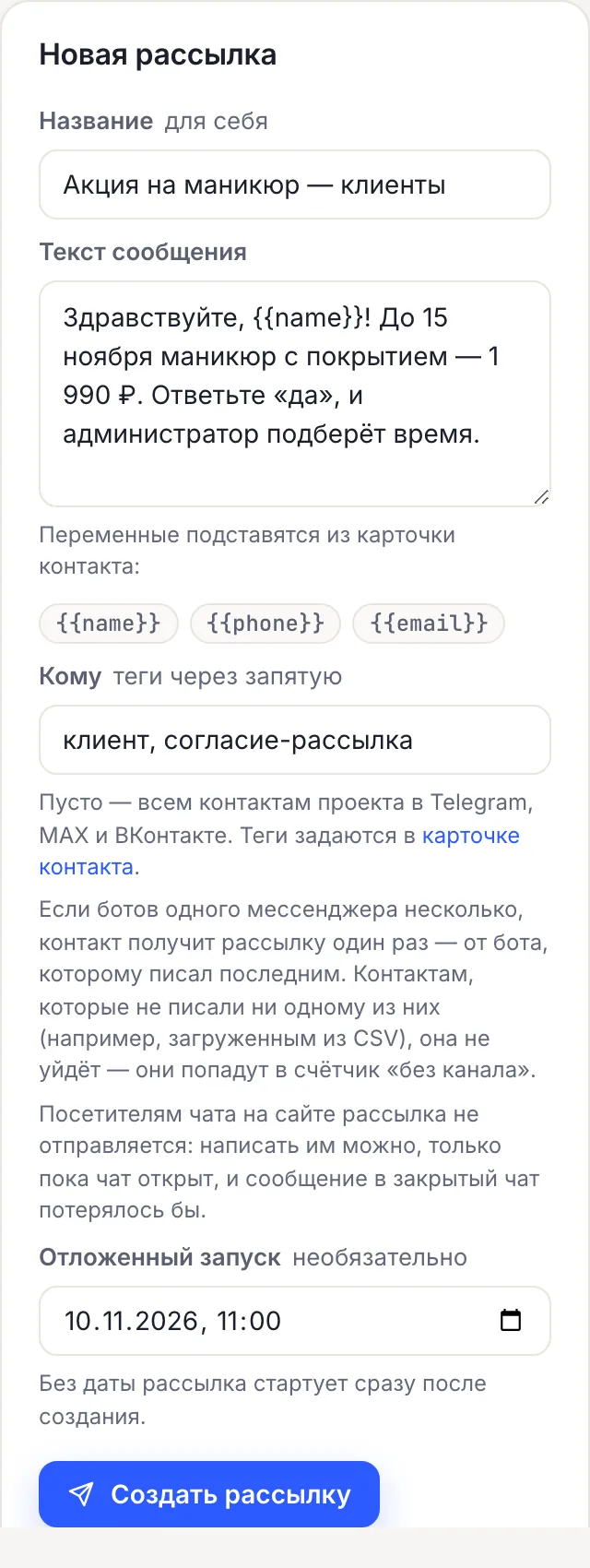
In VK, CHBT takes the name from the profile — first and last name together. So “Hello, {{name}}!” turns into “Hello, Anna Petrova!”. Options:
- write without addressing by name: “Good afternoon!”;
- collect the name with a Data collection block of the Name type — the card will hold what the person called themselves;
- fix the Name field in the contact card manually.
Besides the name, a broadcast supports {{phone}} and {{email}} if they are in the card. More — in the article on broadcast personalization.
Sending and checking
- Write to the community from your account, then in Contacts open your card and add the
testtag. - Broadcasts → New broadcast: Name for yourself, Message text, in To —
test. Create a broadcast. - Check the message in VK: text, name, links, the reply word.
- Create the same broadcast with the consent tag in To.
Text example: “Good afternoon! Next week master Olga has free slots: Tuesday and Thursday after 3 p.m. To book, write BOOK. To unsubscribe, write “stop””. A broadcast has no images or buttons — text only.
Result: the broadcast card shows recipients, delivered, errors and, if any, no channel.
Why some messages are not delivered
| Reason | What happens | What to do |
|---|---|---|
| The person forbade messages from the community | Error, no retry | Nothing — you cannot write to them |
| The profile is deleted or blocked | Error | Nothing |
| The same text to the same person in a row | VK flood control, an error without retry | Do not duplicate a broadcast with the same text |
| Too many requests per second | CHBT retries after a pause | Nothing |
| The community key was rejected | Error; the channel is in Error, the owner gets an email | Channels → “⋯” → Change key |
| The community is disconnected in Channels | The no channel counter | Connect the community again |
If several communities are connected to the bot, a contact gets the broadcast once — from the one they last wrote to. CHBT recognizes a reconnected community by its number and sends through the new connection. All counters — in the article why a bot broadcast is not delivered.
VK botBroadcasts in CHBTBroadcast list in a botHow to connect a VK bot