
Home · CHBT Updates
CHBT Updates
What's been added and fixed in the builder. Newest entries first. Details on each feature are in the help article linked from the entry.
October 21, 2026 · Shop in your bot
Bots now have a shop: a product storefront at chbt.io/s/your-shop. In Telegram it opens right in the chat, in MAX — as the bot's mini app, in VK and on the website — via a link. Cart, delivery options, payment on delivery or online via your YooKassa or CloudPayments with 54-FZ receipts, orders with statuses and refunds.
- An “Opens the shop” button in scenarios and a “Shop” menu button in Telegram.
- A “Shop event” trigger: your own scenario for order placement, payment and shipping.
- A shop funnel in “Sales”: storefront → cart → order → payment.
What the shop can do and how much it costs — the “Shop in your bot” page; how to open one — the help article. Available on the “Basic” plan and higher.
October 27, 2026 · Giveaways in Telegram, MAX and VK
The bot now has a “Giveaways” section. A post with a “Join” button leads to the bot: it checks the subscription to your channels and sponsors’ channels, issues a participant number and optionally adds a “not a bot” check. At the set time the bot re-checks the subscription and picks winners and a reserve from a secret number whose hash was published at the start — any participant can re-check the results on the giveaway page with the “Check in browser” button. The bot messages the winner itself, collects the handover details and separate consent to publish their name, and creates a deal in “CRM” for each place. From Basic — friend invitations for extra chances, retention analytics and participant export. Channel subscription can now be checked in any flow too: the “Subscription” rule in a “Condition”. More on the Telegram giveaway bot page.
October 27, 2026 · Quizzes: points, a quiz bot and templates
The Action block has a new action, Add points: it adds a number to a variable. Condition compares the total, and you can show it in text as {{score}} — this is how you build trivia quizzes with a score and “which … are you” tests.
New quiz templates: “Soviet cinema”, “Word stress”, “Geography of Russia”, the New Year quiz and “Which Russian classic character are you”. These are the first templates from the Basic plan: on Free they are shown with a label and lead to plan selection. Short versions are free in the CHBT quiz bot; more on the Quizzes in Telegram page.
October 27, 2026 · Surveys and questionnaires: answers in the customer card
A message with buttons now has the Save answer to field setting: the label of the tapped button is saved to the customer card. The Action block has a new action, Save to contact field. In Collect data, the Custom option now takes a field name, so each questionnaire question gets its own field — previously such answers overwrote each other in a single field.
Contacts has a new Survey answers section: how many times each option was chosen and what share that is, with a tag filter. The CSV export puts custom fields in separate columns and exports contacts with the selected tag. New templates: Customer survey (NPS) and Customer questionnaire; learn more on the survey bot page.
October 27, 2026 · Steps: a transition for every step and “bot didn’t reply”
In the Steps editor, every step has “Next” with a choice: any step in the flow or “end flow” — transitions are set up without Canvas. The editor warns you if a step comes after Operator (the flow ends once the conversation is handed to a person) and if Reply in comments comes after a start from private messages — that block doesn’t reply there.
If a flow ran but sent nothing to the customer, the conversation is marked “bot didn’t reply”: it shows up in Conversations under Waiting for reply, and operators get a notification. Delay and Operator don’t count — there the reply comes later or from a person.
October 26, 2026 · “Consent to mailing list”: two separate consents
The “Consent to mailing list” template now asks for two consents separately: first to the processing of personal data — naming the operator, the data, the purpose, the term, how to withdraw and a link to your policy (a data-consent tag), then to advertising messages from a named sender (the mailing tag, only on “Yes”). Anyone who has already agreed to data processing gets the second question right away. Asking to withdraw consent or to delete their data removes both tags and passes the request to a staff member: removing a tag by itself does not stop processing, and your organization decides what to delete. Flows created from the template earlier are not changed — to get the new version, create a flow from the template again.
October 26, 2026 · “AI in Russia” mode: Yandex models
Bots now have an “AI in Russia” mode. In it, AI agent replies, the AI seller, intent recognition and flow building are handled only by Yandex models: Alice AI LLM Flash by default — 1 credit per answer, YandexGPT 5.1 Pro optionally — 3 credits. Requests are processed in Yandex Cloud, request logging on Yandex’s side is turned off, and foreign models are neither offered nor called in such a bot, even on failure. It is turned on with the “AI in Russia” card on the “AI agents” page — the owner and admins can switch it. Bots created with the kindergarten, school and club templates and “Answers from documents” run in this mode right away. The mode only restricts the choice of models and does not by itself guarantee that data processing complies with 152-FZ. More in the article on an AI assistant for a kindergarten.
October 26, 2026 · Templates for kindergartens, schools and clubs
- “Kindergarten parent assistant” — daily routine, fees, illness and certificates by buttons; “My child won’t come” and the words “got sick” and “won’t come” (in Russian) pass the name, group and dates to the teacher.
- “Kids’ club and sports class sign-up” — the activity, the child’s name and age, separate consent to personal data processing, a phone, a deal in “CRM” and, 3 days later, the question “How did the trial lesson go?”.
- “School certificates and timetable” — a certificate request to the school office, the bell schedule, first-grade admission and clubs, without AI.
How to build a bot for your institution — on the pages bot for education, for a kindergarten and for a school.
October 26, 2026 · Template library: popular templates and niche collections
On the templates page and in the account wizard, “Popular” templates come first — the ones client bots use most often — followed by collections by industry: salon, shop, online school, kindergarten and school, car service, events, café, real estate, Telegram channel. A template card shows a sample conversation. New templates: “Welcome and menu”, “Answers from documents (AI)”, “Telegram commands”, “Car service booking” — there are now 26 in total. Fixed: if a flow has “Any message”, commands and keywords of the same flow no longer go silent — “Any message” is checked last.
October 24, 2026 · VK connects with a button
A VK community now connects with the “Connect via VK” button: sign in to VK, choose the community — CHBT gets the key and sets up the Callback API by itself. Manual connection with an access key is still available. Step by step — in the help article how to connect VK.
October 21, 2026 · Telegram Stars payments
The “Payment” block has a new “Telegram Stars” option. In Telegram the bot sends an invoice in Stars right into the chat, the buyer pays without leaving Telegram, and the flow continues through the “Paid” output. The amount is from 1 to 10,000 Stars. This is how you can sell courses, consultations and access passes: Telegram requires digital goods and services in bots to be paid with Stars.
- Stars go to your bot’s balance, and CHBT does not touch them; withdrawal is via Fragment in TON.
- There is no 54-FZ receipt for Stars, and they can only be refunded in full.
- The shop in your bot sells digital products for Stars: in the Telegram mini app such a product has a “Buy for N ★” button.
- In MAX, VK and website chat such a step goes to “Error” — there payment is accepted by your provider.
How to set it up and what the seller gets — in the article “Telegram Stars payments in a chatbot” and in the “Shop in your bot” help article. Available on any plan.
October 15, 2026 · YCLIENTS booking and visit reminders
The new “YCLIENTS booking” flow block books the customer directly into the salon’s appointment book. The bot shows services with prices, staff members, and available days and times from YCLIENTS online booking, asks for a phone number, and creates the booking. Before the visit, it reminds the customer about it in the same chat — 24 hours ahead, or 2, 3, 12, or 48 hours ahead. If the booking is deleted in YCLIENTS, no reminder is sent.
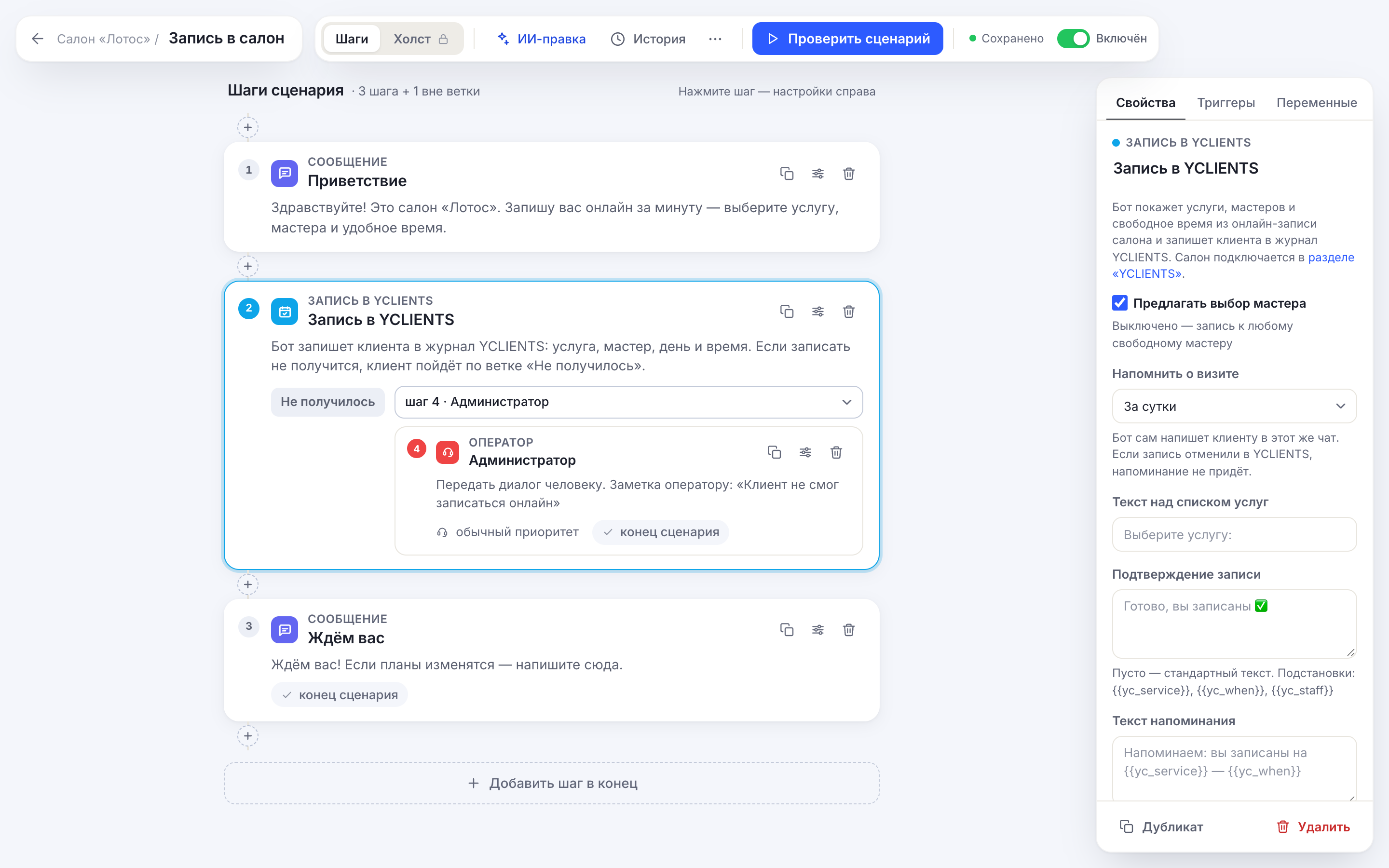
- Works in Telegram, MAX, VK, and the website chat.
- You connect it in the bot’s new “YCLIENTS” section: a link to your online booking page and a partner token from your YCLIENTS developer account. You don’t need your YCLIENTS login and password.
- The section has a log of all bookings made by the bot, with the reminder status.
How to connect: the Help article “YCLIENTS booking via a bot”; ready-made flows for salons are on the blog.
October 15, 2026 · Buttons in messages
- You can add several buttons with Russian text to one message, and each one gets its own output. Previously, a new button replaced the previous one. If your flow already had such buttons, open it and save it — the buttons will be split, and you’ll only need to connect them to the right steps.
- The bot now also recognizes buttons without a service tag in older messages — a tap follows its own branch instead of going to “Next”.
- In MAX, buttons are now placed one per row, as in Telegram, so long labels are no longer squeezed into one line.
October 15, 2026 · Operator replies, now by email too
If a website chat visitor left an email address, an operator’s reply from “Conversations” is also sent to them by email: the person may have left the page and missed the reply in the chat.
October 15, 2026 · Updated terms of use
We’ve updated the terms of use and public offer agreement: the sections on personal data processing, storing and deleting information, how AI features work, and the parties’ liability.