
Home · Blog · How to set up an auto-reply on Avito: built-in auto-replies and replies with the price from the listing
How to set up an auto-reply on Avito: built-in auto-replies and replies with the price from the listing
An auto-reply on Avito is set up in two ways: with built-in auto-replies — Messages → Chat automation → auto-replies, up to 100 templates — or with a CHBT bot connected to Avito via API keys: it greets the buyer with the listing title, fills in the price, answers common questions as the buyer chooses and passes the chat to you in Conversations. Below — how the two ways differ, how to set up each step by step, how to check the reply and how to turn off the Avito auto-reply so the buyer does not get two greetings.
Built-in Avito auto-reply or a bot: the difference
The comparison is based on the Avito help center as of November 8, 2026 and on how the Avito channel works in CHBT.
| Avito auto-replies | CHBT bot | |
|---|---|---|
| Where it is set up | In Avito: Messages → Chat automation | In CHBT: the Avito channel and a flow |
| What you need | The Auto, Goods and Services categories; in Beauty and Health — the Services Master subscription | An Avito subscription with API access: goods and jobs — Maximum, services — Extended or Maximum |
| How the reply is chosen | Avito detects the question itself and sends your template | The buyer picks a topic with a number, the reply follows the flow; from Basic an AI agent answers in its own words from your base |
| Listing data in the text | — | Title, price, link and listing number — as variables |
| Handover to a person | You reply yourself in Avito | Call a person — the chat goes to CHBT Conversations, operators are notified |
| Where else it works | Only Avito | The same flow in Telegram, MAX, VK and on the website |
Avito also has the Avito Assistant: it answers common questions from the listing data itself, but does not answer if you are online at that moment.
If there are few simple questions, built-in auto-replies are enough. A bot is needed when there are many buyers, the answer depends on the listing, and hot buyers must be passed to a person and seen in one window with other channels.
How to set up the built-in Avito auto-reply
- Open Messages and press the Chat automation button at the top of the page. In the app — the icon next to search in Messages.
- Choose auto-replies and fill in answers to the questions buyers ask most. You do not have to fill in every field.
- Add a greeting — it is sent on the buyer’s first message — and, if needed, your own questions and answers.
- Turn off unneeded questions with the switch on the right.
Avito limits: the text is no longer than 1,000 characters, links only to Avito, up to 100 auto-replies in total. The buyer sees an auto-reply as your ordinary message.
How to set up an auto-reply with a CHBT bot
- Check your Avito subscription. Without a subscription with API access Avito does not give messages to services: for goods and jobs — Maximum, for services — Extended or Maximum.
- Copy the keys. Avito Pro → Integrations (avito.ru/professionals/api): Client ID and Client Secret.
- Connect the channel. In CHBT open Channels → the Avito card → Connect with Avito keys. Paste the Client ID and Client Secret and press Connect Avito. CHBT subscribes to messages itself.
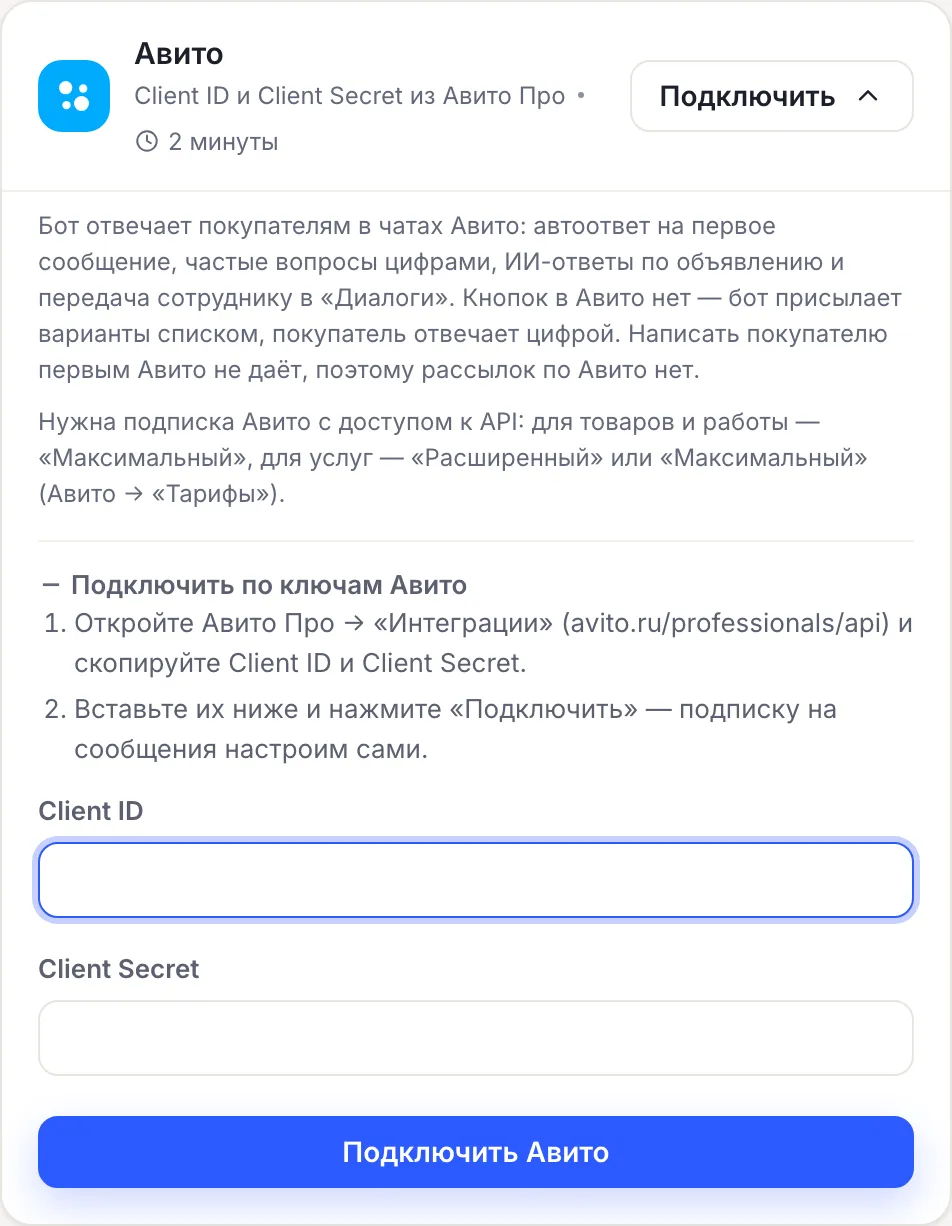
If there is no subscription with API, the channel is not saved, and the dashboard shows the reason: “Avito did not give access to messages: the Maximum subscription is required…”. Wrong keys — “Avito did not accept the keys — copy the Client ID and Client Secret again”.
- Create a flow from the template. Press Create a flow, in the Sphere row choose Store, Real estate, Car service or Other and the Avito auto-reply card → Create a flow.
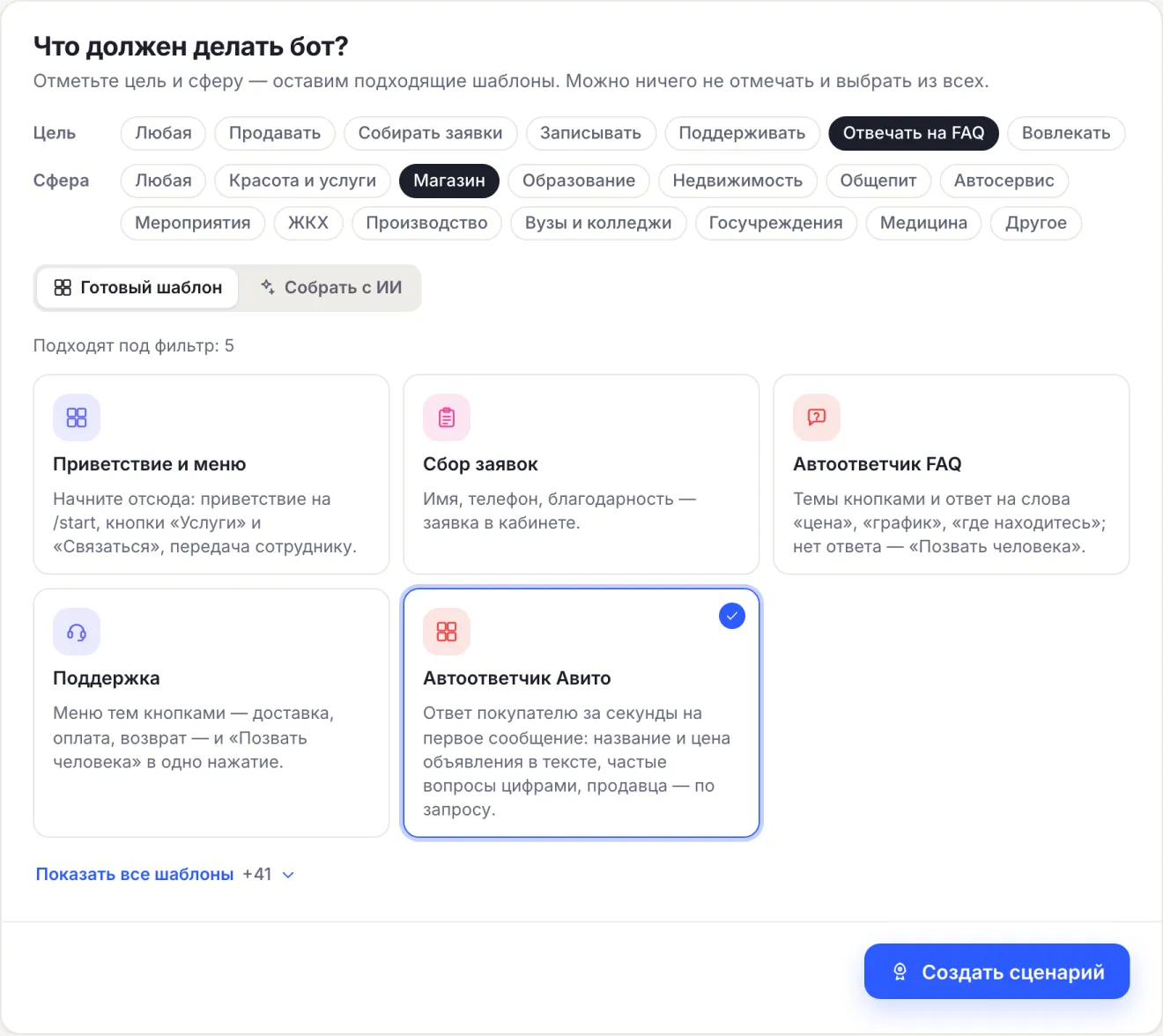
- Enter your answers. The template has a greeting and the topics Price and bargaining, Delivery, Availability, Where to see it and Call a person. The answers are drafts that say “Replace this text”: bargaining and discounts, delivery options and times, the address and viewing time.
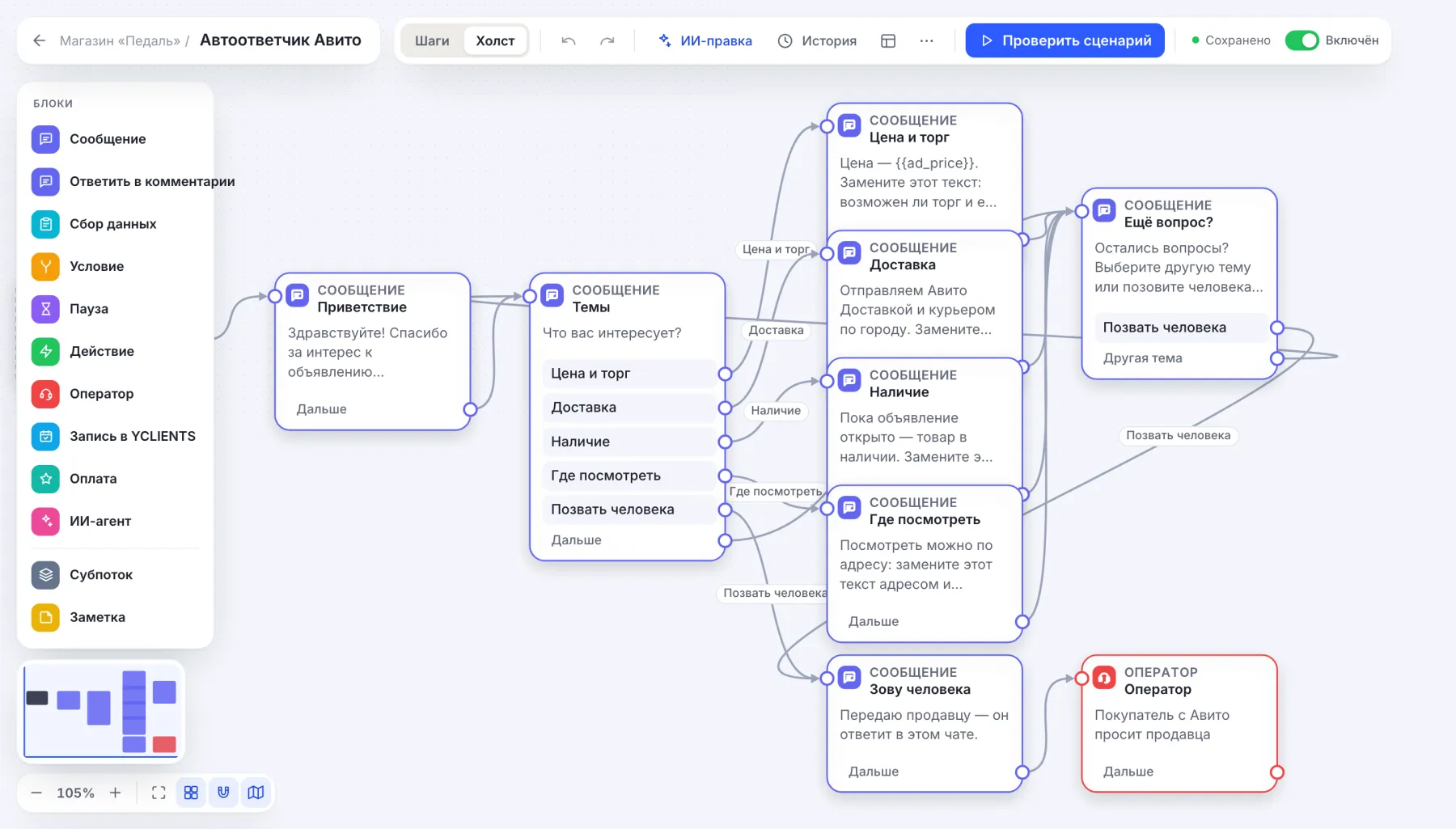
Listing data in the reply
The bot knows which listing the buyer is writing about and puts it into the text:
| Variable | What is filled in |
|---|---|
{{ad_title}} | Listing title |
{{ad_price}} | Price from the listing |
{{ad_url}} | Link to the listing |
{{ad_id}} | Listing number |
In the template the greeting already contains the title, and the Price and bargaining topic contains the price. The bot takes the buyer’s name from the Avito chat. An AI agent sees the same data if you added it to the flow (from Basic): it answers from your knowledge base and knows which listing is meant.
What the buyer sees
There are no buttons in the Avito messenger, so the bot sends options as a numbered list. The template menu looks like this for the buyer:
What are you interested in?

1. Price and bargaining
2. Delivery
3. Availability
4. Where to see it
5. Call a person

Reply with a number.
Replying “2” or “Delivery” works like a button press. The buyer’s first message in the chat — anything, even “Hello” — starts the greeting, like the /start command in Telegram. The bot sends long text as several messages of 1,000 characters.
Each Avito chat is a separate contact in CHBT: a buyer who wrote about two listings is two conversations.
How to test
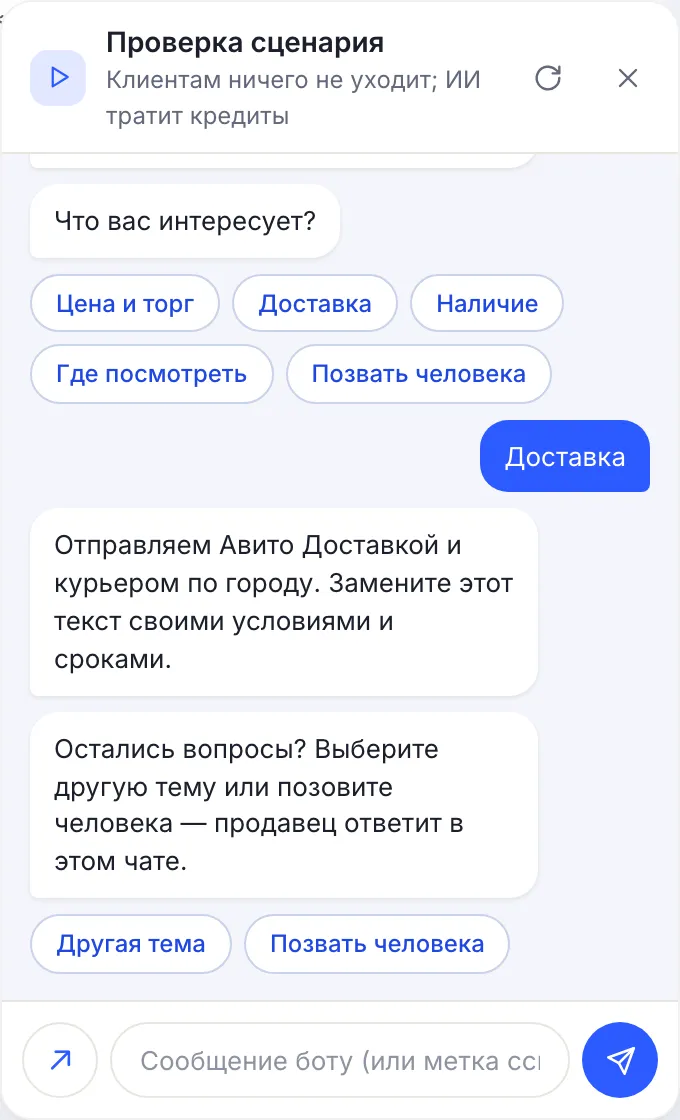
- In the editor press Check flow and write any message. The test chat shows options as buttons, and the listing title and price are empty there: they come only from an Avito chat.
- Ask a friend to write to the chat of any of your listings. The bot should reply with a greeting with the listing title and the list of topics.
- Open Conversations in CHBT: the chat appears there with the buyer’s name. The bot’s reply is also visible in the Avito app, and the chat stays unread — you will not miss it.
- Ask them to reply “5” — Call a person: the chat goes to an operator, and a reply from Conversations goes to the same Avito chat.
The bot is silent — check the channel row in Channels. Error status with a reason from Avito — press Reinstall webhook in the channel menu.
How to turn off the auto-reply on Avito
- Built-in auto-replies. Messages → Chat automation → auto-replies: turn off unneeded questions or the greeting with the switch on the right.
- Avito Assistant. Messages → Chat automation → Avito Assistant → Turn off the assistant.
- CHBT bot. Turn off the flow in Flows — the bot stops replying, the channel stays. Delete the Avito channel — CHBT unsubscribes from the account’s messages.
If the CHBT bot is on, turn off the greeting in Avito auto-replies — otherwise the buyer gets two greetings in a row.
What the bot on Avito does not do
- It does not write first. Avito only allows replying in chats where the buyer wrote, so there are no broadcasts on Avito.
- It does not see your replies from the Avito app. If you replied to a buyer yourself in Avito, the bot does not know it and continues the flow on the next message. To make the bot stay silent, handle such a chat through Call a person and Conversations.
- It replies only with text. A photo from the buyer is shown in Conversations with the mark “📷 Photo”.
- It does not move old chats and does not reply to reviews.
The Avito channel is included in every CHBT plan. On Free — 30 conversations a month across all channels, the AI agent — from Basic, 650 ₽ a month per bot. Connecting the first channel turns on 3 days of the Business plan. What else a bot for Avito sellers can do — on the page a chatbot for Avito.
FAQ
How do I set up an auto-reply on Avito without third-party services?
Messages → Chat automation → auto-replies: fill in answers to common questions and a greeting. According to the Avito help center — up to 100 auto-replies, text up to 1,000 characters, links only to Avito.
Why is a bot better than the built-in Avito auto-reply?
The bot fills in the listing title and price, lets the buyer choose a topic with a number, passes hot buyers to Conversations and works with the same flow in Telegram, MAX, VK and on the website. From the Basic plan an AI agent answers from your base.
Which Avito subscription does the bot need?
One with API access: for goods and jobs — Maximum, for services — Extended or Maximum. Without it Avito does not give messages to services, and the channel in CHBT will not connect.
Can the bot message a buyer first?
No. Avito only allows replying in chats where the buyer wrote, so there are no broadcasts on Avito.
How do I turn off the auto-reply on Avito?
Built-in auto-replies and the greeting are turned off with switches in Messages → Chat automation. The Avito Assistant — in the same place, Avito Assistant → Turn off the assistant. The CHBT bot is turned off in Flows.
Chatbot for AvitoAvito auto-reply templateAI agentConversations