
Home · Blog · How to create an AI agent in a chatbot: setting the tone, rules by topic and unanswered questions
How to create an AI agent in a chatbot: setting the tone, rules by topic and unanswered questions
An AI agent in CHBT is set up in three layers: the knowledge base — what it knows, the Persona — who it is, and the Tone, Answers and Topic rules fields — how it speaks and what it does not do. Below — which settings the agent has, how to write rules it actually follows and how to close, week by week, the questions it does not yet know the answer to.
How to create an AI agent: five steps
- Open AI agents and press New agent.
- Set Name and Person — who answers customers, for example “You are a polite beauty salon manager. Answer briefly and to the point”. Press Create agent.
- Fill in the Knowledge base: Text — prices and terms, Link — a website page, Whole website — the home page and up to 15 pages, File — a document.
- Check the answers with Ask the agent a question: ask 5–10 real customer questions.
- Add the AI agent block to a flow — the agent answers customers inside the flow, in the channels where the bot works.
After creation the agent gets settings for tone, reply length, rules by topic and the reminder — they are covered below. AI agents are available from the Basic plan and in the trial.
What shapes the agent’s behaviour
An AI agent in CHBT has three layers of settings:
- Knowledge base — what the agent knows: price list, terms, addresses, frequent questions. This is the data it takes facts from.
- Persona — who it is: “You are a polite salon manager”. It sets the role and the general style.
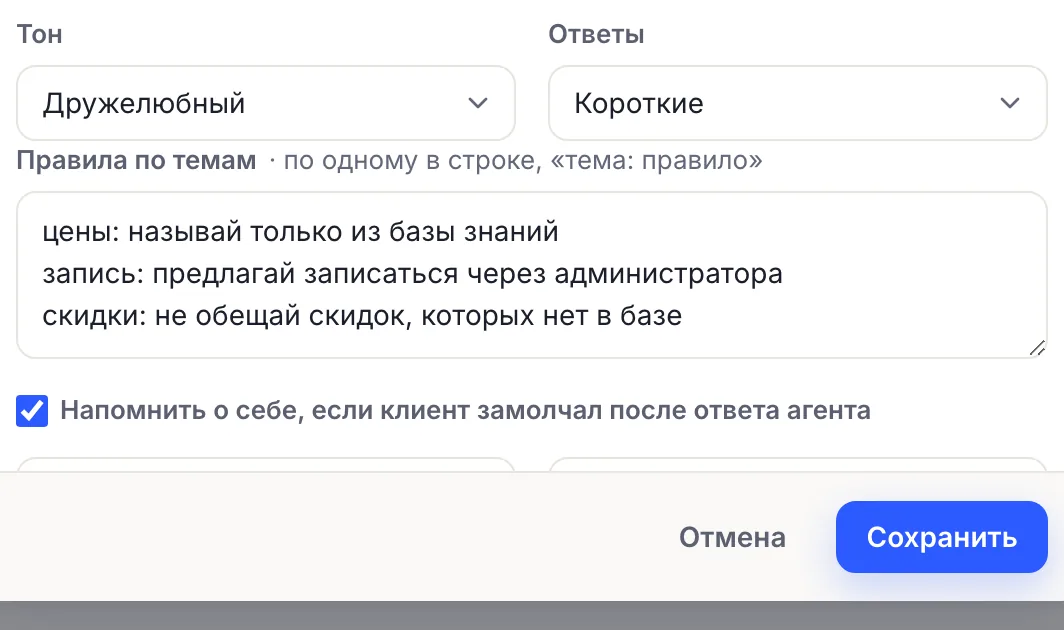
- Tone, length and Rules by topic — how it speaks and what it does not do. These settings are added to the persona and apply to every reply.
If the agent answers wrongly, look for the cause in the knowledge base first: most often the needed fact is simply missing. Rules are for something else — behaviour, not data. How to build a knowledge base is covered in the article “A knowledge base for an AI agent”.
Tone: from business-like to sales
The Tone field has five options:
- As in the role — the agent speaks as set in the persona, nothing is added.
- Friendly — a warm tone, polite form of address, no officialese. Suits salons, cafés, schools, home goods.
- Business — restrained, polite, no emojis or extra emotion. For B2B, lawyers, accounting, medicine.
- Expert — precise wording and facts from the base, with no promises beyond it. For complex services and equipment.
- Sales — stresses the benefit for the customer and ends by suggesting the next step: book, leave a contact, place an order. Without pressure.
Tone does not change facts: a Sales agent will not invent a discount that is not in the base. It just ends its replies with a call to action more often.
Reply length
The Replies field sets the length: Normal, Short — one or two sentences, or Detailed — in points if the question is complex.
In a messenger, short replies are almost always better: people read on a phone, and a wall of text puts them off. Choose Detailed if the agent explains complex things — choosing equipment, contract terms, how to prepare for a procedure. A compromise is Normal plus a rule like “delivery terms: list them in points”.
Rules by topic: how to write them so the agent obeys
Rules by topic are the main place where you control behaviour. Write one rule per line in the format “topic: rule”. Up to 20 rules in total. The agent receives them as strict instructions from the owner.
Examples that work:
prices: quote only from the knowledge base; if there is no price, offer to check with a managerrefunds: do not promise a refund, offer to contact an operator right awaydiscounts: do not invent discounts or promotionsbooking: always offer to leave a phone number for confirmationcompetitors: do not discuss other companiesmedicine: do not diagnose, advise coming for a consultation
A good rule is specific and checkable. “Be polite” changes nothing: that is already in the tone. “Do not name delivery times if the customer has not given a city” does.
When the agent does not know the answer
If the agent is not confident in an answer, the question goes to the Unanswered list on the AI agents page. The customer still gets the agent’s reply, and what happens next depends on the block setting in the flow:
- The “Separate “didn’t understand” output” checkbox is on — the block gets a Didn’t understand output, and after an unconfident reply the flow follows it. Connect this output to the Operator block, and such questions will go to a person.
- The checkbox is off — the flow continues through the Next output, as after a normal reply.
Tip: for first-line support, turn on “Separate “didn’t understand” output” and lead it to the Operator — this way a customer with a tricky question will not get stuck talking to the AI.
Working with the Unanswered list is simple:
- Open Unanswered and read the question.
- Write the answer the agent should give to such a question.
- Press Add to knowledge base — the answer is added to the base, and next time the agent answers confidently.
- If the question is random or off-topic — Dismiss.
The same question repeated within a day is not duplicated in the list. Make it a habit to go through Unanswered once a week: within a month the agent covers most of the questions it was initially unsure about.
A reminder to a customer who went quiet
A common situation: the agent replied, the customer read it and went quiet. The option “Send a reminder if the customer goes quiet after the agent’s reply” sends one gentle message after 1, 3, 6 or 12 hours.
- You set the text. By default: “If you have any questions left, write to me — I’m here.”
- There is one reminder per agent reply and no later than a day after it — the bot will not pester the customer.
- It works in Telegram, MAX and VK. There is no reminder in the website chat: the visitor has already left the page.
- The text is sent as is, without calling the model, so the reminder does not spend AI credits.
A good reminder is specific: “Shall I find you a free slot for tomorrow?” works better than “Are you there?”.
A knowledge base from your website in a minute
If you have a website, you do not have to rewrite it into the knowledge base by hand. The Whole website source opens the home page and up to 15 pages linked from it — services, prices, contacts — and adds each one as a separate source. It takes up to a minute.
What to do afterwards:
- look through the added pages and remove the unnecessary ones — the cookie policy, empty sections;
- add as text what is not on the website: internal rules, answers to awkward questions, refund terms;
- if prices on the website change, refresh the source after edits — the agent answers from what is in the base.
A single page can be added with the Link source, a document — with File, and short facts — with Text.
How to check the settings
- Open a flow with the AI agent and press Check flow. AI nodes in the test chat answer for real and spend AI credits; nothing is sent to customers.
- Ask 10 real customer questions, including awkward ones: “can it be cheaper?”, “give my money back”, “are you better than competitors?”.
- Check that every rule works: ask the price of a service that is not in the price list; ask for a discount; ask about a refund.
- Change the tone and ask the same question — the difference should be visible at once.
A detailed bot testing checklist is in the article “How to test a chatbot”.
Ready-made setups for different businesses
- Beauty salon: Friendly tone, Short replies; rules — “prices: only from the price list”, “booking: offer a free slot and ask for a phone number”, “medicine: do not give advice on contraindications”. A reminder after 3 hours: “Shall I find you a convenient time?”.
- Online store: Sales tone, Normal replies; rules — “stock: if the product is not in the base, offer similar ones”, “delivery: name times only for the customer’s city”, “refunds: straight to an operator”.
- Lawyer, accountant: Business tone, Detailed replies; rules — “consultations: do not give legal opinions, offer to book”, “cost: quote only from the price list”.
- Online school: Expert tone; rules — “programme: only from the course description”, “payment: give the link from the base, do not promise instalments if there are none”. A reminder after 6 hours.
Common mistakes
- Facts in rules instead of the base. “A haircut costs 1,500 ₽” is data and belongs in the knowledge base. Rules are for behaviour.
- Contradictory rules. “Always name the price” together with “prices: only from a manager” will confuse the agent.
- A Sales tone without a base. The agent has nothing to offer and starts repeating general phrases. Base first, then tone.
- Nobody goes through Unanswered. The agent will keep answering the same questions without confidence.
- No Didn’t understand output. Without the “Separate “didn’t understand” output” checkbox, an unconfident reply looks like any other, and the customer will not reach a person.
- A reminder after an hour for everything. For expensive services people need time to think — set 6–12 hours.
AI agent in CHBTKnowledge base for AI agentHow to test a chatbotFirst line of AI support