
Home · Blog · Lead scoring in a chatbot: how the bot tells a hot lead from a cold one on its own
Lead scoring in a chatbot: how the bot tells a hot lead from a cold one on its own
Lead scoring in CHBT is built from ordinary flow blocks, without AI: questions with buttons → after each answer Action → Add points to the score variable → a Condition with branches “≥ 6” — a hot lead, “≥ 3” — warm, Otherwise — cold. The score is saved to the card with Save to contact field and the level with a tag, and hot leads immediately get a CRM deal and Notify an operator. Scoring is needed when there are more requests than a manager can handle in a day; with five a week it is easier to call everyone.
Which questions to ask
Three or four questions are enough. More — and some people will not get to the end. A classic set:
- Budget — “Up to 50 thousand”, “50–150 thousand”, “More than 150 thousand”.
- Timing — “This month”, “Within three months”, “Just looking”.
- Role — “I decide myself”, “I need my manager’s approval”, “I am collecting options for colleagues”.
- Task — one question for your product: type of property, team size, number of products.
Ask questions with buttons, not open text: a button gives a precise answer that is easy to score. An open answer like “well, around a hundred thousand” the bot cannot rate that way.
How to add points
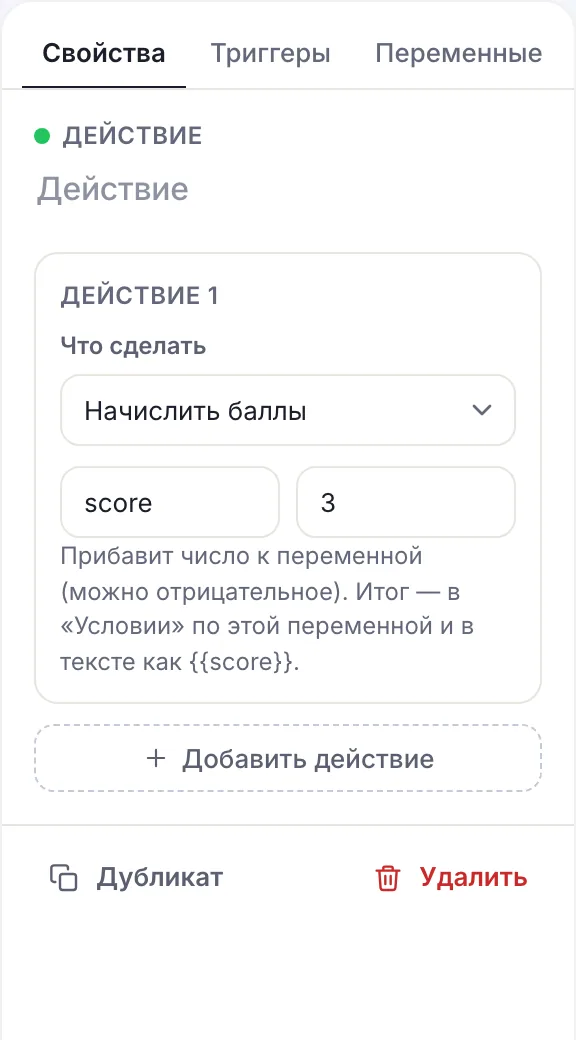
CHBT has an Add points action for this. It adds a number to a flow variable:
- A Message with a question and buttons. Each button with the Goes to a flow step action leads to its own Action step.
- In each step — Action → Add points: Variable name —
score, Points — 3 for the answer “More than 150 thousand”, 2 for “50–150 thousand”, 0 for “Up to 50 thousand”. - All three steps converge on the next question.
Points can also be subtracted: Points accepts negative numbers, from −1000 to 1000. If the variable does not exist yet, counting starts from zero. A hint in the editor reminds you: the total is checked with a Condition on this variable and shown in text as {{score}}.
A sample scale
| Question | Answer | Points |
|---|---|---|
| Budget | More than 150 thousand | 3 |
| 50–150 thousand | 2 | |
| Up to 50 thousand | 0 | |
| Timing | This month | 3 |
| Within three months | 1 | |
| Just looking | −1 | |
| Role | I decide myself | 2 |
| I need approval or am collecting options | 1 |
The maximum here is 8 points. Thresholds: from 6 — a hot lead, from 3 — warm, below 3 — cold. The first scale does not have to be perfect: after a month compare the points with actual sales and adjust the weights. A negative point for “Just looking” helps not to confuse a curious visitor with a buyer, even if their budget is large.
A branch by result
After the last question — a Condition block with three branches:
- “Hot” — Variable
score“≥”6; - “Warm” —
score“≥”3; - Otherwise — cold.
Order matters: branches are checked top to bottom, and “≥ 6” must be above “≥ 3”. Otherwise a 7-point lead will land in warm — that branch fits it too and is checked earlier. Other branches for flows — in the article with condition examples.
What to do with a hot lead
A hot lead loses value with every hour. In the “Hot” branch put several actions at once:
- Data collection — the phone with Input validation Phone, if it is not there yet.
- Action → Add a tag
lead-hot. - Action → CRM deal: deal name
Hot — {{name}}, {{score}} pts, Stage — New. - Action → Notify an operator: Notification text
Hot lead {{name}}: {{score}} points, call now. - A Message to the customer: “Thank you! A manager will contact you within 15 minutes”.
If requests also come at night, split hot leads once more by time: during business hours — a promise of a call in 15 minutes, otherwise — “We will call tomorrow from 9 am”. An honest deadline is better than a fast one that will not be met.
Warm and cold leads
Warm leads benefit from a next step without a manager: case studies, a cost estimate, booking a demo. Set the lead-warm tag and a deal at the New stage — the manager will take it after the hot ones.
Cold leads do not need a call. The lead-cold tag and useful material: a checklist, a selection, an invitation to the channel. In a few weeks you can send them a broadcast by this tag — some people will “ripen”.
Each request gets exactly one level tag. Then Filter by tag in Contacts shows each segment separately, and a broadcast can be sent only to cold leads without touching those the manager is already working with.
Where to save the score
The score variable lives while the flow is running. On the next bot start variables are reset, and the score disappears. To keep it in the customer card, add Action → Save to contact field after the calculation:
- Contact field —
scoreor “Scoring”; - Value —
{{score}}.
Now the score is visible in Contact fields in the customer card and goes into the CSV export as a separate column. A manager who opens the card immediately sees how warm the customer is — and the level tag lets you filter all hot leads in one click.
If a customer goes through qualification again — for example, came back a month later with a new task — Save to contact field overwrites the old value with the new one. That is right: the latest answer is what matters, not the previous one.
Scoring and an external CRM
If the team works in amoCRM, connect the ready-made integration in the integrations section: a request in which the customer first left a phone or email in Data collection becomes a deal with the name, phone, email and request text on its own. The score stays in the CHBT card: the manager sees it in Contact fields, and the level by the tag.
If you need the score in an external CRM deal, pass it with Action → HTTP request in the result branch: the flow variables go into the JSON together with score, and an automation service maps them to the deal fields. More — in the article on leads from the bot into a CRM.
How to test and tune the weights
- Go through the flow in Check flow three times: with the strongest answers, with the weakest and mixed. Each time look at which branch you landed in.
- Show the score in the last message of the test:
Your result: {{score}}— this shows right away whether the points added up correctly. Remove this line before launch. - After a month export Contacts to CSV and compare the
scorefield with who actually bought. - If there are buyers among the “cold” ones, raise the weight of the question that gives them away or lower the hot threshold.
In the test chat the CRM deal is not created — test that part from a real messenger.
Common mistakes
- Too many questions. Every extra question cuts the share of people who reach the end. Three or four are enough.
- Open answers. Points are added for buttons; the bot cannot rate the text “about a hundred”.
- The “≥ 3” threshold above “≥ 6”. Hot leads drown among warm ones. The narrow branch goes first.
- The score was not saved. Without Save to contact field it disappears on the next bot start.
- Several level tags on one customer. If a person took the test twice, remove the old tag with Remove a tag before setting a new one.
Leads from a bot in CRMChatbot condition examplesCRM and contactsWhat a lead is