
Home · Chatbot for a property management company and HOA
Solutions for housing and utilities
Chatbot for a property management company and HOA
Residents message the property management company's bot in MAX, VK, Telegram or the website chat: they report a leak, a power, elevator or yard problem, submit water meter readings and subscribe to notices for their building. A request with the address and phone becomes a deal in “CRM”, dispatchers get a notification, and readings go into the resident's card fields and export to CSV.
Three templates: requests, readings, noticesWork without AI, on FreeMAX, VK, Telegram and website
What the bot does for a management company and HOA
Residents' requests
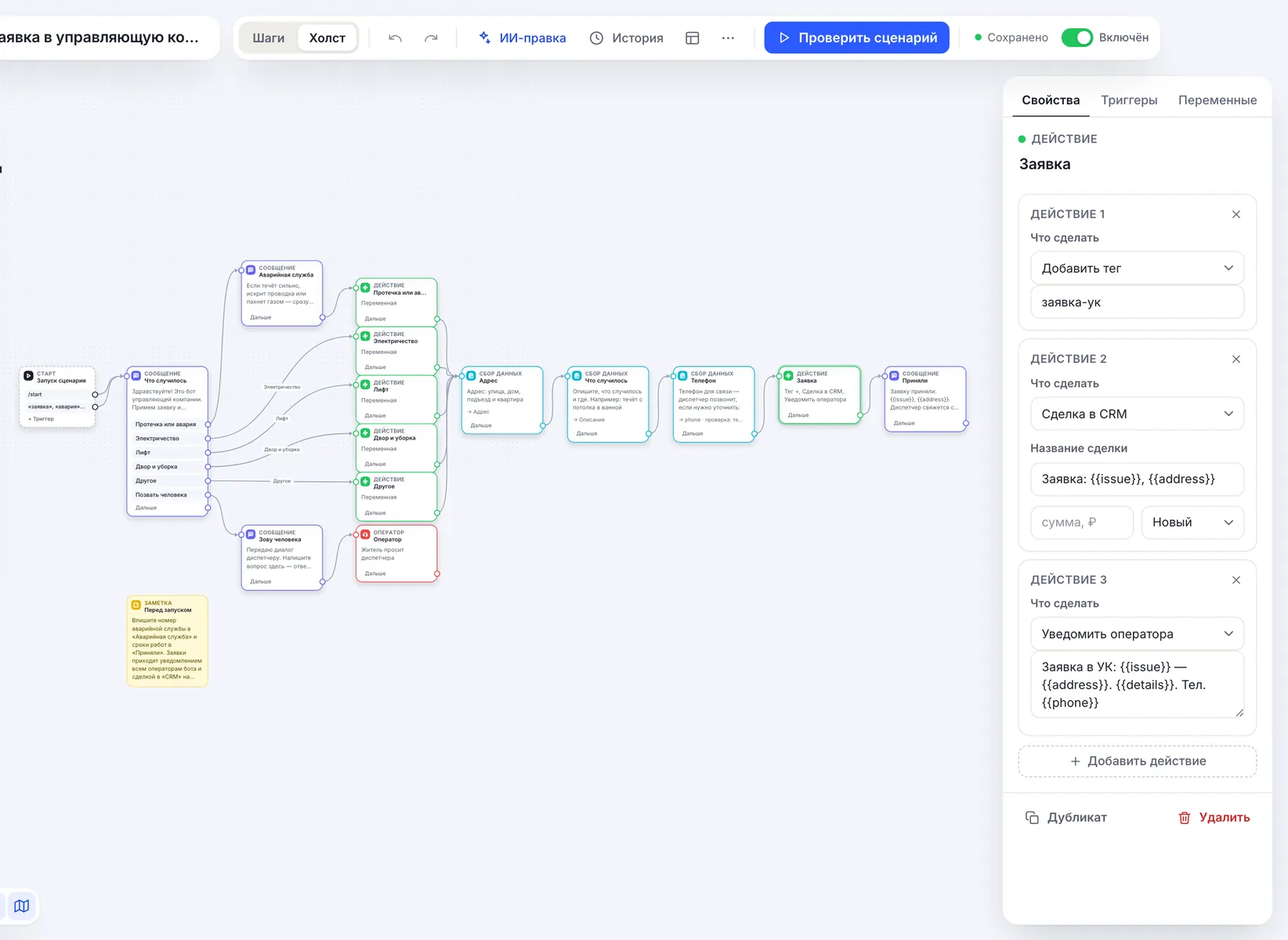
Problem type by button, address, description and a phone number with format check. The words “заявка”, “авария”, “протечка” open the menu from anywhere. In “CRM” — a “Request: type, address” deal at the “New” stage, and dispatchers get a notification with the phone.
The emergency number first
On “Leak or emergency” the bot first gives the emergency dispatch number and the gas service 104 and only then takes the request. When water is pouring or there is a smell of gas, the bot does not replace a phone call.
Meter readings
The “Meter readings” template: personal account or address, cold and hot water. Answers are saved to the “Personal account”, “Cold water” and “Hot water” fields of the resident's card and export to CSV as separate columns.
Notices by building
The “Notices to residents” template: a resident picks their building and gets the “дом-N” tag. You send a water outage or a meeting as a broadcast by the building tag — from Basic, text only.
Answers from documents
From Basic an AI agent answers in its own words based on your rules, rates and schedules — up to 15,000 characters of text per agent. If the documents have no answer, the question goes to an employee.
The dispatcher — in the same chat
“Call a person” moves the conversation to “Conversations”: the dispatcher replies in the messenger where the resident wrote. While an employee handles the conversation, the bot stays silent.
How to launch a management company bot
-
1
Create a bot with a template
The “Use the property management template” button leads to sign-up: the bot is created with the “Property management request” template and the editor opens. Already have a bot — “Flows” → “All templates and AI”, sphere “Housing & utilities”: “Meter readings” and “Notices to residents” are there too.
-
2
Enter your details
The emergency number goes into the “Emergency service” message, work deadlines into “Accepted”. In “Notices to residents” rename the building buttons and tags, in “Meter readings” — the submission dates.
-
3
Connect channels
“Channels” → MAX, VK or Telegram, the chat code for the website — in the “Widget” section. One flow replies in all connected channels.
-
4
Give residents the link
The bot link and QR code — on the notice board in the entrance, on the utility bill and in the building's community. The bot replies to those who wrote first, so a resident taps “Start” once.
Ready-made flow: a request to the management company
What happened — by button, the emergency number for a leak, address, description and phone. A “Request: type, address” deal in “CRM” and a notification to dispatchers. No AI: works on any plan.
Property management request Leak, power, lift or yard by button, address, description and phone — a deal in CRM and a notification to the dispatcher. Open →What it looks like in the account
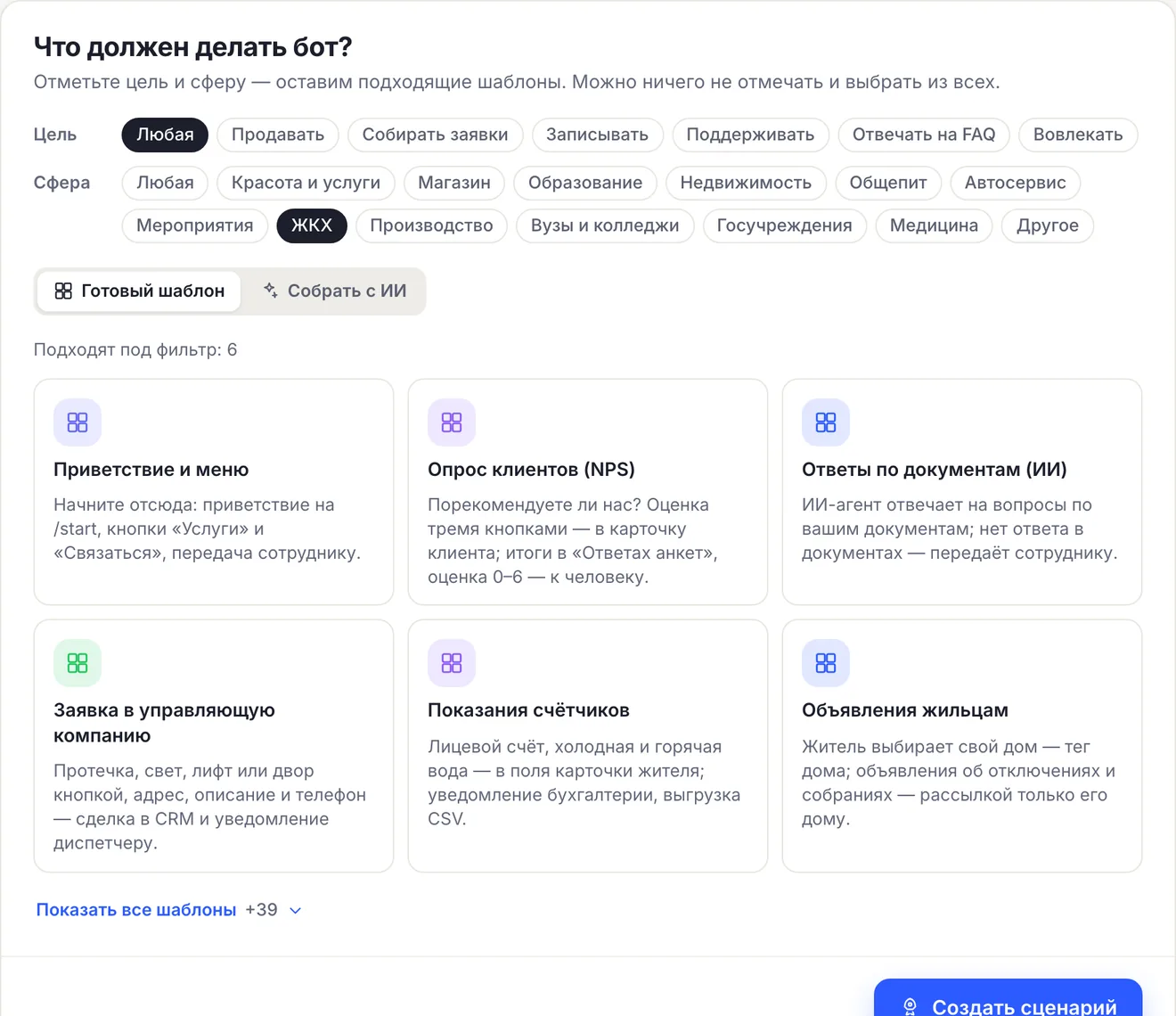
In the flow wizard tick the “Housing & utilities” sphere — the templates for a management company remain.
The template opens in the editor already assembled: buttons for request types, collecting the address, description and phone, an “Action” with a tag, a deal and a notification.
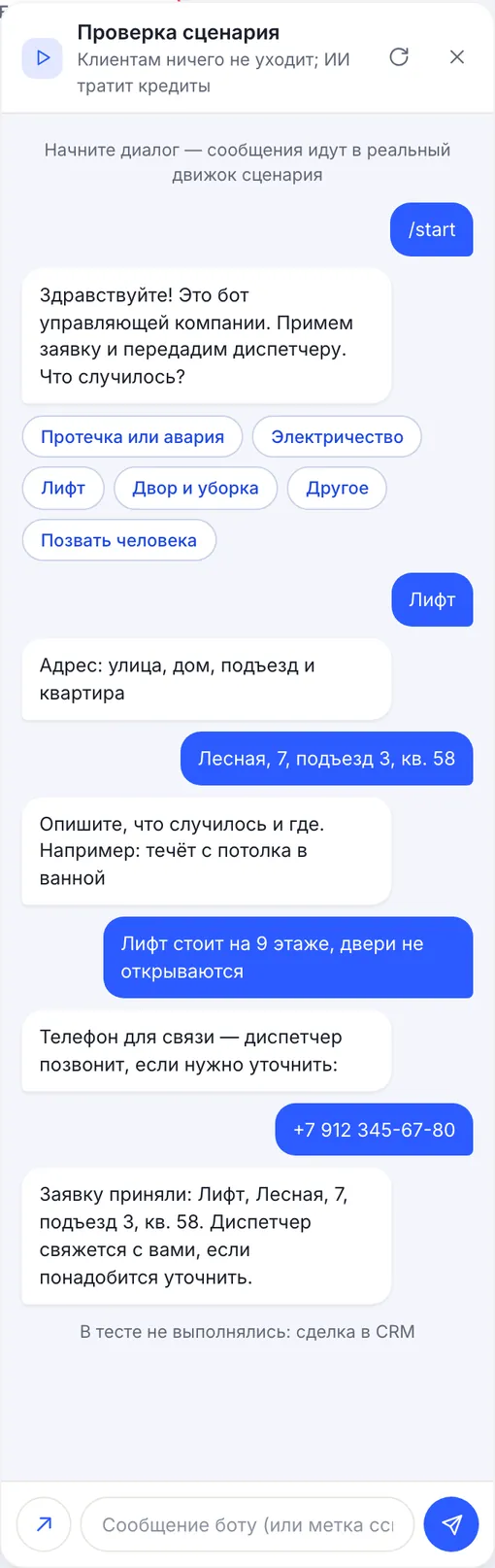
“Check flow” runs the conversation as a resident. The test does not create the deal and says so at the bottom.
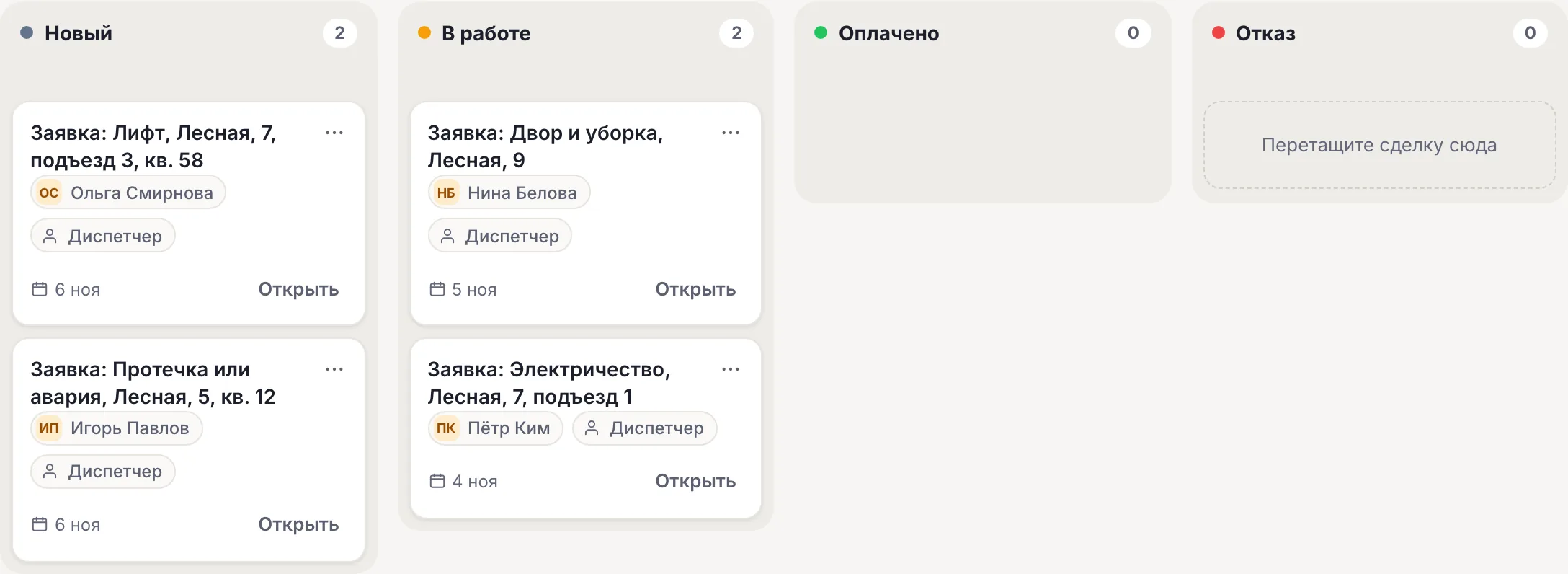
At work each request is a card in “CRM”.
Three housing templates: what goes where
| Template | What it asks | Where the result is |
|---|---|---|
| “Property management request” | What happened — by button, address, description, phone | A “Request: type, address” deal in “CRM”, a notification to dispatchers, the заявка-ук tag |
| “Meter readings” | Personal account or address, cold water, hot water | Resident card fields, “Contacts” → “Survey answers”, CSV export, the показания tag |
| “Notices to residents” | Building by button | The объявления and дом-N tags — the broadcast audience |
Deal stages in “CRM” are fixed — “New”, “In progress”, “Paid”, “Denial”: new requests land in “New”, move the ones taken into work to “In progress”. The bot does not tell the resident the request status itself — the dispatcher writes from “Conversations”. Electricity or heating readings — one more “Data collection” block with its own field.
- The management company bot does not replace GIS ZhKH or Gosuslugi and is not connected to them: requests and readings stay in CHBT.
- Readings do not go to billing by themselves: they are exported to CSV from “Contacts”.
- A reminder about readings is a broadcast by the “показания” tag; it can be scheduled for a date (from Basic).
152-FZ: servers and AI in Russia, consent before data
CHBT's main servers and database are located in Russia (Moscow); Telegram messages pass through our node abroad. The housing templates work without AI and do not send residents' messages to any models. If you add an AI agent, turn on the “AI in Russia” mode on the “AI agents” page: Yandex models in Yandex Cloud will reply — Alice AI LLM Flash for 1 credit or YandexGPT 5.1 Pro for 3 — and foreign models are not used in the bot. The mode limits the choice of models and by itself does not guarantee that data processing complies with 152-FZ.
The request and readings templates have no separate consent step: the bot asks for the address and phone right away. If your lawyer considers consent necessary, put a message with the consent text and the “I agree” and “No” buttons first — that is how the “Blue-collar hiring” and “Citizen appeals” templates work: data is collected only after “I agree”. How roles and consent work — in the article on 152-FZ and a chatbot.
Payment by invoice and EDI
Organizations and public sector institutions can pay for a plan by invoice from a bank account; the contract and closing documents — including via EDI. To get an invoice, write to help@chbt.io.
The price is per bot per month: Basic — 650 ₽, Business — 1290 ₽. Several buildings or sites are easier to run in one bot with building tags than in separate bots.
What a property manager’s bot does not do
The limits are clear before you launch.
- Does not replace the emergency service: for a leak or a gas smell it gives the number and takes the request afterwards.
- Is not connected to GIS ZhKH, Gosuslugi or billing: readings are in the resident's card and in CSV.
- Does not tell the resident the request status itself: the dispatcher replies from “Conversations”.
- Does not write first: notices go only to those who subscribed in the bot.
- A broadcast is text only and goes only to Telegram, MAX and VK: it doesn’t reach the website chat.
Available plans
The price is per CHBT bot per month. Free's 30 conversations are 30 different residents a month across all channels together: enough to check the flow, not enough for a 200-apartment building. Dispatchers are invited in the “Access” section from Basic. An organization can pay by invoice, documents — including via EDI.
Works with
FAQ
Is the bot connected to GIS ZhKH?
No. The management company bot does not replace GIS ZhKH or Gosuslugi and does not send data there: requests stay in CHBT “CRM”, readings — in the resident's card fields and in the CSV export.
Who receives residents' requests?
All bot operators: the “Request: type, address” deal lands in “CRM” at the “New” stage, a notification with the phone comes to the open account and as a push notification if it is on. Dispatchers are invited in the “Access” section from the Basic plan; on Free there is one operator — the owner.
How do I collect the month's readings?
In “Contacts” — CSV export: the “Personal account”, “Cold water” and “Hot water” fields are separate columns. The same answers are visible in “Contacts” → “Survey answers”.
Can I send a notice to just one building?
Yes. A resident subscribes with their building's button and gets the “дом-N” tag; pick that tag in “Broadcasts”. Broadcasts are available from the Basic plan, text only and only to subscribers.
Can we pay by invoice?
Yes. Organizations and public institutions can pay for a plan by invoice from a bank account; the contract and closing documents can also go through electronic document exchange (EDI). To get an invoice, write to help@chbt.io.
Residents' requests — in one list, not in building chats
Create a bot with the “Property management request” template, enter the emergency number and hang a QR code in the entrances. Free plan, no card needed.