
Home · Blog · Chatbot for a property manager: resident requests, meter readings and notices by building
Chatbot for a property manager: resident requests, meter readings and notices by building
In CHBT a chatbot for a property management company is built from three ready-made templates: Property management request takes accidents and faults and creates a deal in CRM with a notification to the dispatcher, Meter readings writes the account number, cold and hot water into the resident’s card, and Notices to residents subscribes people to the news of their building. Below — how to build each template step by step, how to check it, where to see requests and readings, and what a property manager’s bot does not do.
Three templates and what they give
| Template | What the resident does | What the company gets | Plan |
|---|---|---|---|
| Property management request | Chooses what happened, writes the address, description and phone | A deal “Request: type, address” in CRM, a notification to dispatchers | Any |
| Meter readings | Writes the account number or address and the water readings | The account, cold water and hot water fields in the card, a CSV export, a notification | Any |
| Notices to residents | Presses the button of their building | Notice and building tags for a broadcast | Broadcast — from Basic |
All three have no AI. On the Free plan the bot handles 30 conversations a month and one operator — enough to test the flows on one building. To work with residents you need Basic, 650 ₽ a month per bot: no conversation limit, with broadcasts and with dispatchers in the Access section.
A request to the property manager: step by step
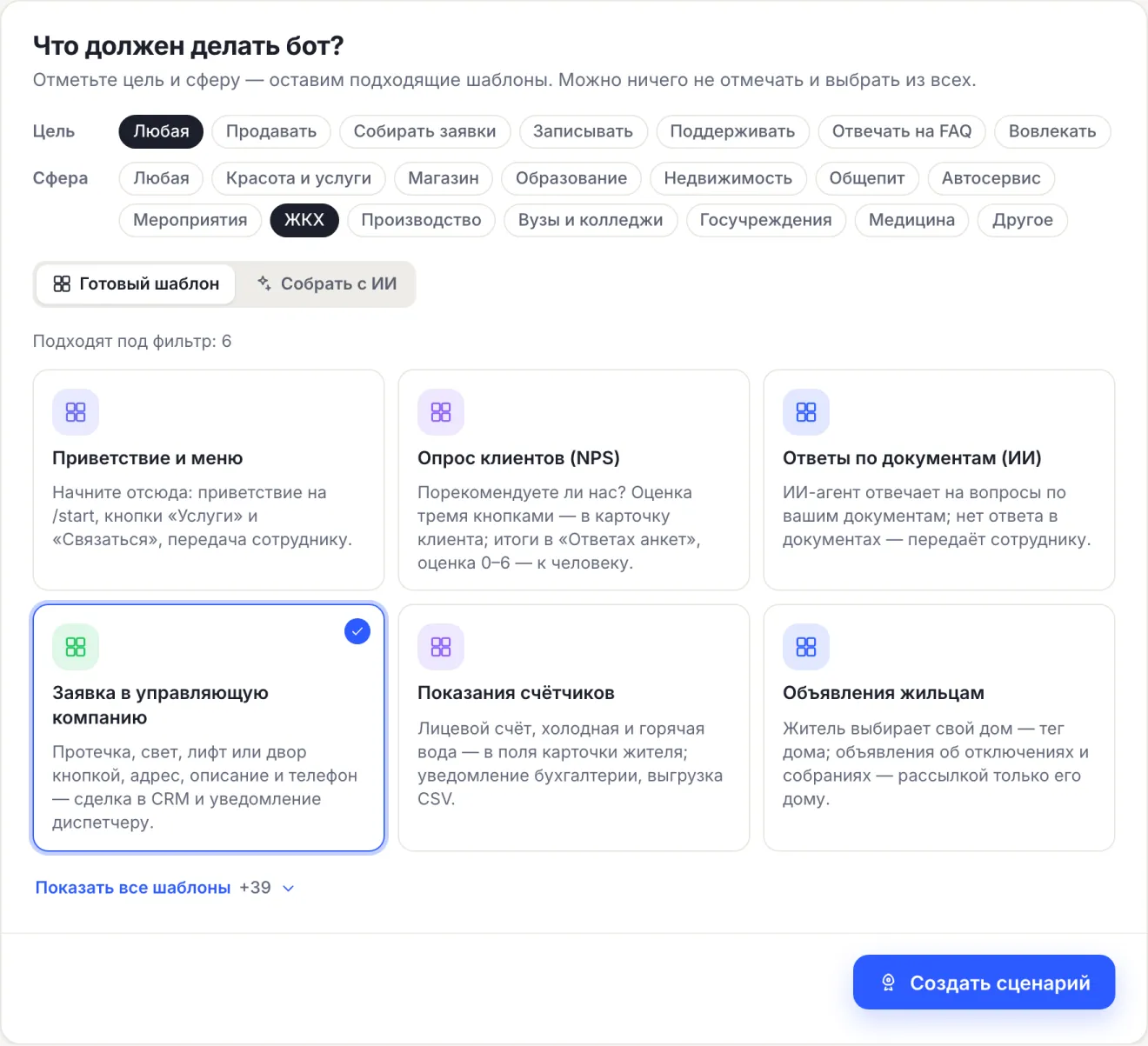
- Open the bot, press Create a flow, in the Sphere row choose Housing & utilities.
- Choose the Property management request card and press Create a flow. The flow opens in the editor turned on; if another flow already answers /start — turned off.
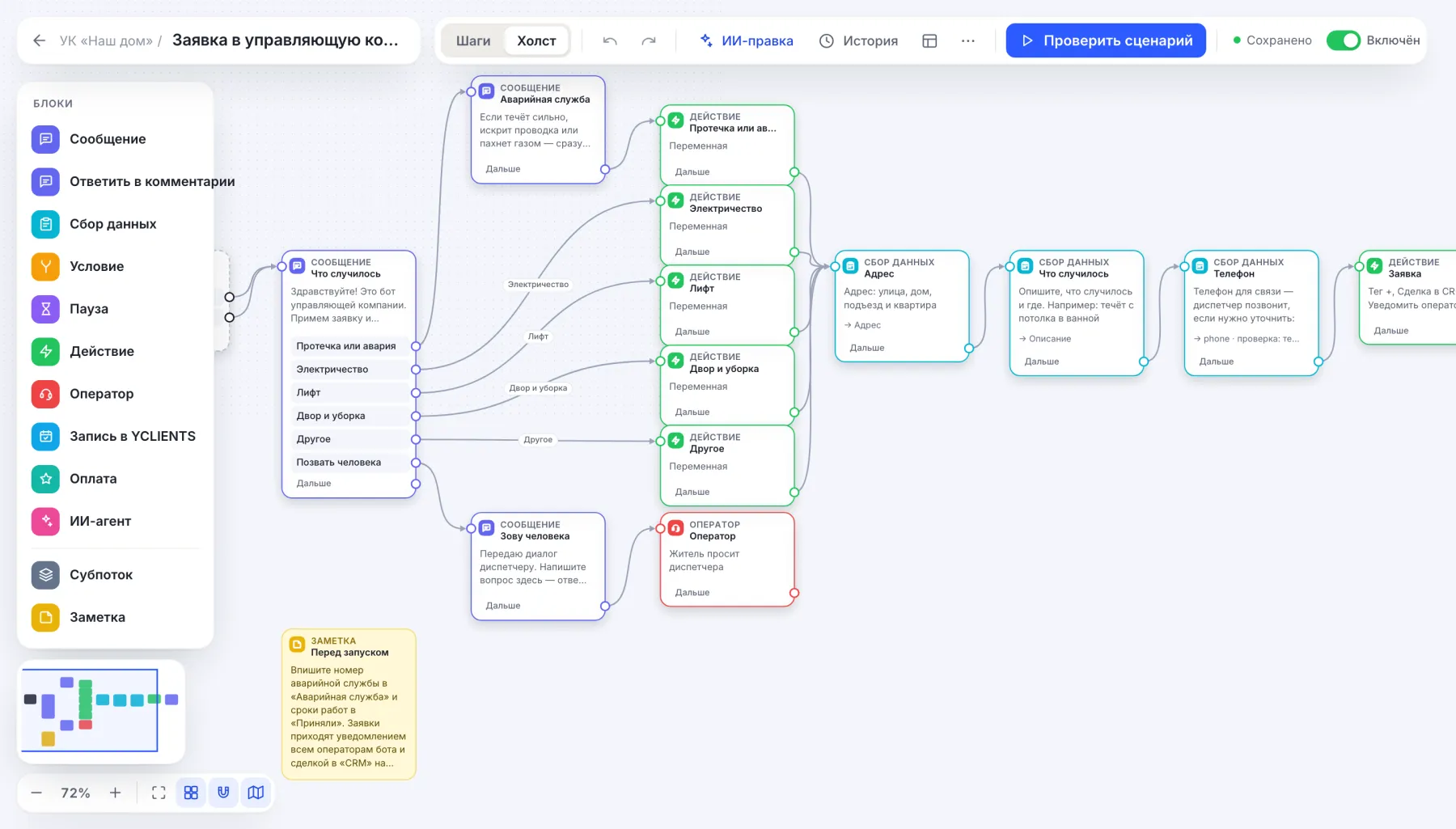
- In the Emergency service block replace the text with your emergency dispatch number. The bot shows this block first when Leak or accident is chosen: if water is pouring or there is a smell of gas, the resident must call rather than wait for a reply in the chat.
- In the Received block write real deadlines for the work.
- Request type buttons can be renamed, or you can add your own: a new button and an Action block that writes the name into the
issuevariable.
Then the resident writes the address, the description and the phone. The bot checks the phone: without a code it will not accept the number and asks for an example like “+7 900 000-00-00”. The words “request”, “accident” and “leak” open the request menu from anywhere in the conversation.
Where the dispatcher sees requests
After the phone the bot does three things: tags the resident with the request tag, creates a deal “Request: Leak or accident, 12 Sadovaya St, apt 45” in CRM at the New stage and sends operators a notification with the request type, address, description and phone — in the dashboard and as a push, if push is on.
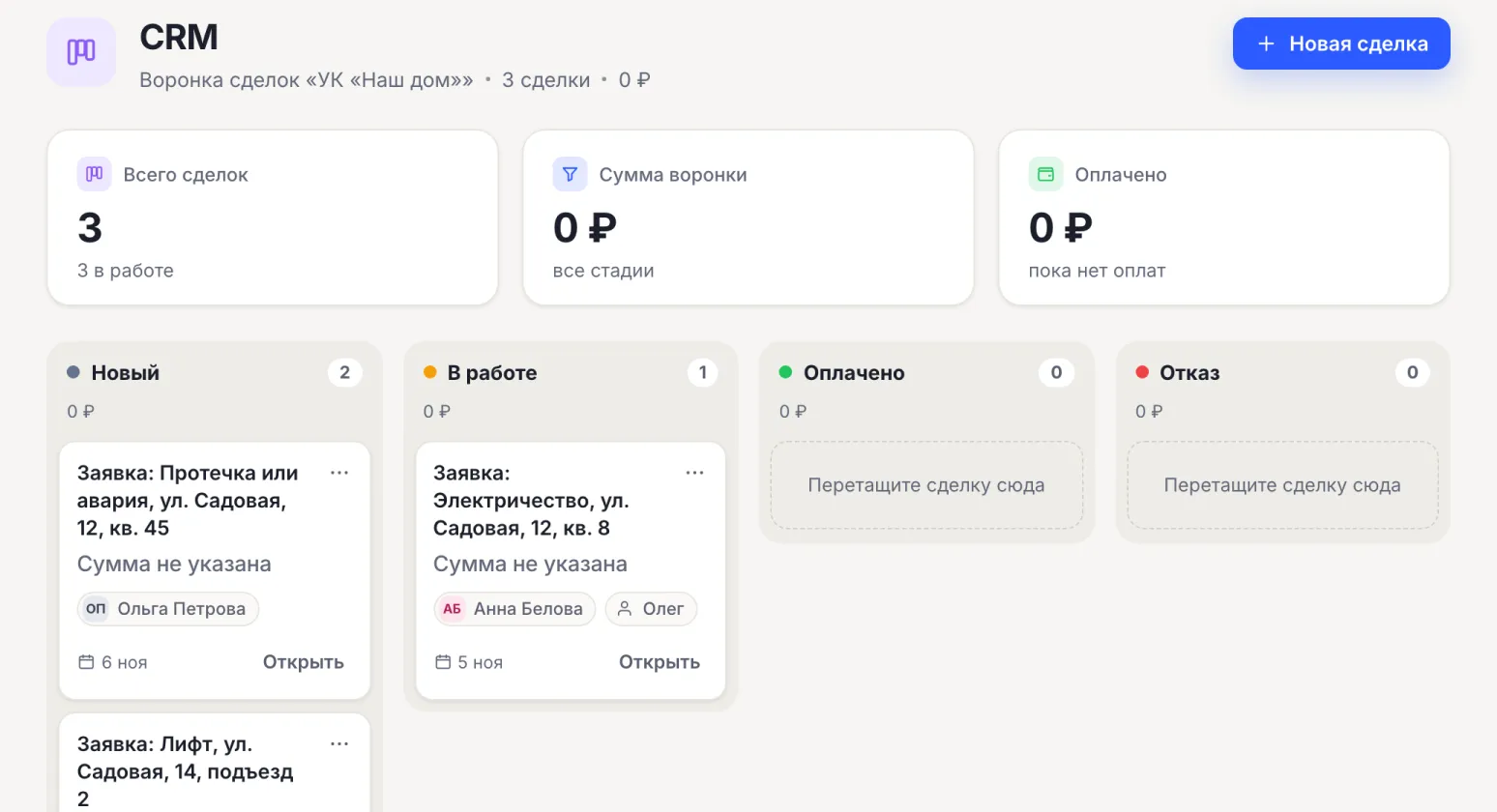
- Taken on — drag the card to In progress and set a responsible person.
- Closed — move it to Paid or Denial: the stages are shared by all CHBT bots and cannot be renamed, so agree internally that Paid means “done”.
- To reply to the resident — from Conversations, in the same messenger the request came from.
The bot does not tell the resident the request status itself: the dispatcher writes. How requests land in CRM in general — in the article requests from a bot to CRM.
Meter readings through a bot
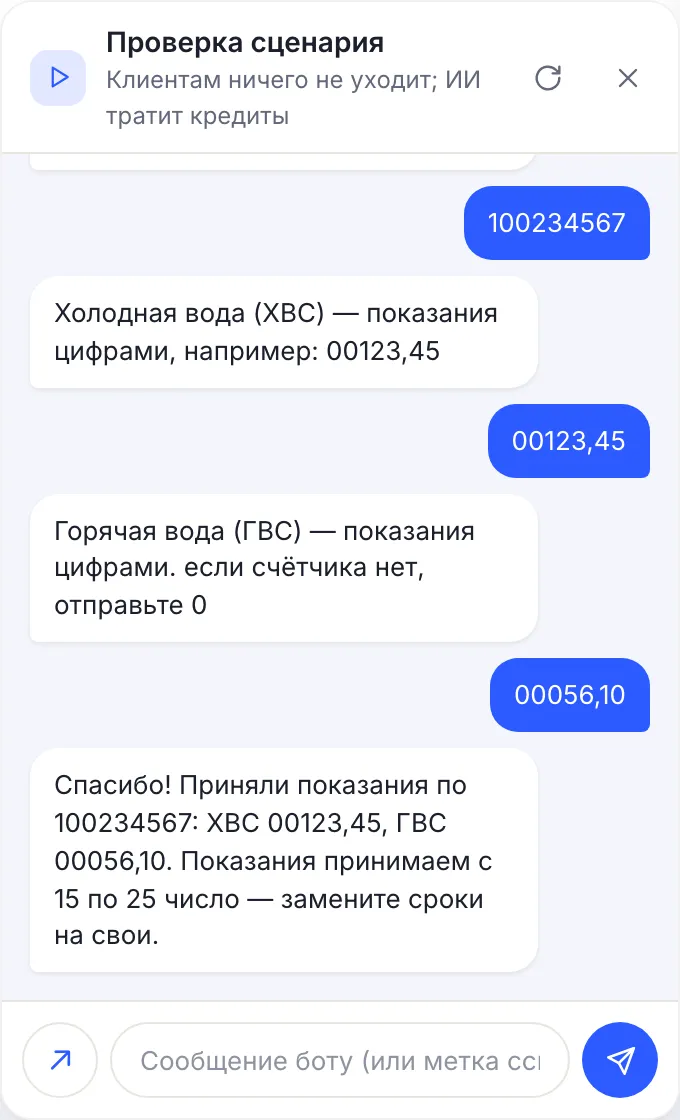
Create the Meter readings template as a second flow from the same wizard. The resident presses Submit readings or writes the word “readings”, then answers three questions:
- Account number — the number or the address;
- Cold water;
- Hot water — “0” if there is no meter.
Readings are accepted as free text: the “number” check does not let a comma through, and residents write “00123,45”. What to replace: in the Received block — your reading submission dates instead of “from the 15th to the 25th”. Need an electricity or heating meter — add another Data collection with its own field.
Where to look. This template does not create a deal — the readings are in the resident’s card. In Contacts open the card → Additional fields (JSON): the account number, cold water and hot water are there. For accounting press CSV export filtered by the readings tag — each field becomes a separate column. A summary by field is the Survey answers button.
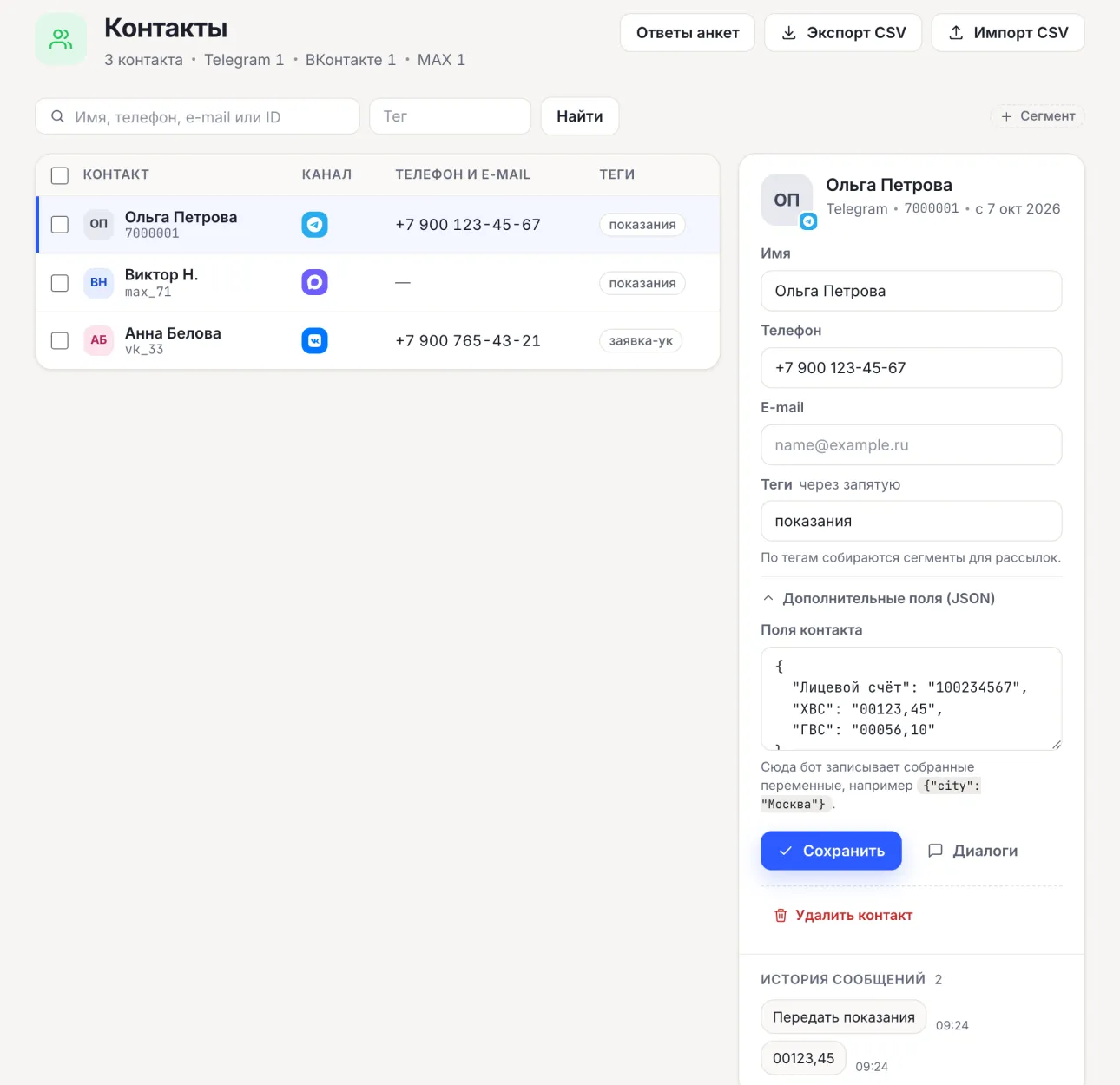
The card stores the latest submitted readings: the next submission overwrites the fields. Keep the monthly history in your accounting system — export the CSV after the submission period ends. A monthly reminder is a broadcast by the readings tag from Basic, with the date in the Scheduled start field.
Notices to residents by building
- Create the Notices to residents flow. In the first message rename the Building 1, Building 2, Building 3 buttons to addresses, for example “12 Sadovaya”.
- In the Action blocks change the tags
дом-1… to clear ones, for exampleсадовая-12. Enter the same tag in the Unsubscribe block — otherwise “unsubscribe” will not remove it. - A new building is another button, an Action block with a tag and a line in Unsubscribe.
- Send a notice about a water shutdown in Broadcasts by the building tag, a general one — by the notices tag. The date and time are set by the Scheduled start field.
A broadcast goes as text and only to those who subscribed in the bot. Service notices only: advertising needs a separate consent to broadcasts. More on setup — in the articles broadcasts by tags and a scheduled broadcast.
Answers to residents’ common questions
Tariffs, office hours, how to replace a meter, where to bring documents — such questions are answered by the Answers from documents (AI) template from the Basic plan. The AI agent answers from your knowledge base — up to 15,000 characters per agent — and if the answer is not there, passes the question to an employee. On installation the template switches the bot to AI in Russia mode: Yandex models answer. The mode limits the choice of models and does not by itself guarantee compliance with 152-FZ.
What a property manager’s bot does not do
- It does not replace GIS ZhKH and Gosuslugi. There is no integration with them: readings and requests stay in CHBT and are moved to your system with a CSV export.
- It does not report the request status itself. The dispatcher replies to the resident from Conversations.
- It does not accept utility payments and does not show the account balance.
- It does not write first. A broadcast reaches only those who opened the bot themselves: put the link and a QR code on the notice board in the entrance and on the bill.
Organizations and public institutions can pay for a plan by invoice from a bank account; the contract and closing documents can also go through electronic document exchange (EDI). To get an invoice, write to help@chbt.io.
All flows for property management companies and homeowners’ associations are collected on the page a chatbot for a property management company.
Property management request templateMeter readings templateNotices to residents templateChatbot for a property management companyBroadcasts by tags